

This guide covers the Meta-specific SKAN setup. If you haven’t connected Meta Ads to Linkrunner yet, start with the
Meta Ads integration guide.
Prerequisites
Before you begin, make sure you have:- A connected Meta Ads integration (App ID, ad account, and CAPI configured)
- Your app live with a SKAN-ready Linkrunner SDK version (see minimum versions)
- Admin access to your Meta Business Manager and Meta Events Manager
- Your app events arriving in Meta Events Manager. Meta requires events from your app in the past 90 days, and its SKAN setup only lists events it has received. See Configure Events in Meta Events Manager.
1. Prepare Your App
Update the SDK
Your app must run a SKAN-ready SDK version. The SDK updates conversion values automatically as users perform events, so no SKAN code is needed on your side. Check the minimum SDK versions.Add Meta’s Ad Network Identifiers
Apple only generates SKAN postbacks for ad networks listed in your app’sInfo.plist. Add Meta’s identifiers under SKAdNetworkItems:
On Expo, add these under
ios.infoPlist.SKAdNetworkItems in your app.json.Add the Postback Copy Endpoints
Add these keys to yourInfo.plist so Apple sends copies of SKAN postbacks to Linkrunner:
The Linkrunner Expo plugin adds these keys automatically.
2. Configure the SKAN Schema in Linkrunner
Linkrunner converts your event list into SKAN conversion values (0-63) and generates the fine and coarse values Meta needs.1
Set up event priority
Go to Settings → SKAN Setup → Events Setup in the Linkrunner
Dashboard. Add the events that
matter for optimization and drag rows to set priority. The topmost event has the highest priority.
2
Set ranges
For revenue events, set a min and max range. For other events, click Add Average to track how often
the event happens. Without an average, Linkrunner only records whether the event happened.
3
Generate the mapping
Click Next: Generate SKAN Mapping. The button stays disabled while your configuration would exceed Apple’s
limit of 64 conversion values. Remove an event or an average until it becomes available.
4
Turn on SKAN
Turn the switch at the top of Settings → SKAN Setup to Enabled. Linkrunner does not send conversion
values to your app while SKAN is disabled.
If you already configured the schema for Google Ads, no extra work is needed. Linkrunner reuses the same schema for
Meta.
3. Map Events to Meta
Map each Linkrunner event to the corresponding Meta event (for example,Purchase, AddToCart, ViewContent) so postbacks are tagged correctly in Meta Events Manager.
1
Open event mapping
2
Map each event
For each event in your SKAN schema, select the Meta event it should map to.
3
Enable revenue
Turn on Send Revenue for revenue events and select the currency.
4
Save
Click Save.
signup must be mapped. Until it is, the Meta SKAN Configuration tab lists the events that still need a mapping instead of your conversion values.
See the full walkthrough in Meta Ads → Event Mapping.
4. Configure SKAN in Meta Events Manager
Keep the Linkrunner values open in a separate tab while you work in Meta. Go to Settings → SKAN Setup → Meta SKAN Configuration in the Linkrunner Dashboard. It has two tabs:- Fine Conversion Values: each Priority number, the Meta event (or events) for it, and the revenue range for revenue events
- Coarse Conversion Values: one Meta event each for High, Medium, and Low
Step 1: Turn On SKAdNetwork 4.0
- Open Meta Events Manager, go to Datasets, and select your app’s dataset
- Open the Settings tab and scroll to Set up tasks for iOS app events
- Under Apple’s SKAdNetwork, click See extra settings
- Turn SKAdNetwork 4.0 on
- Turn SKAdNetwork for the Facebook SDK off, so SKAN conversion values come only from Linkrunner
- Click Configure events. If your app already has a SKAN configuration, the button reads Edit events.
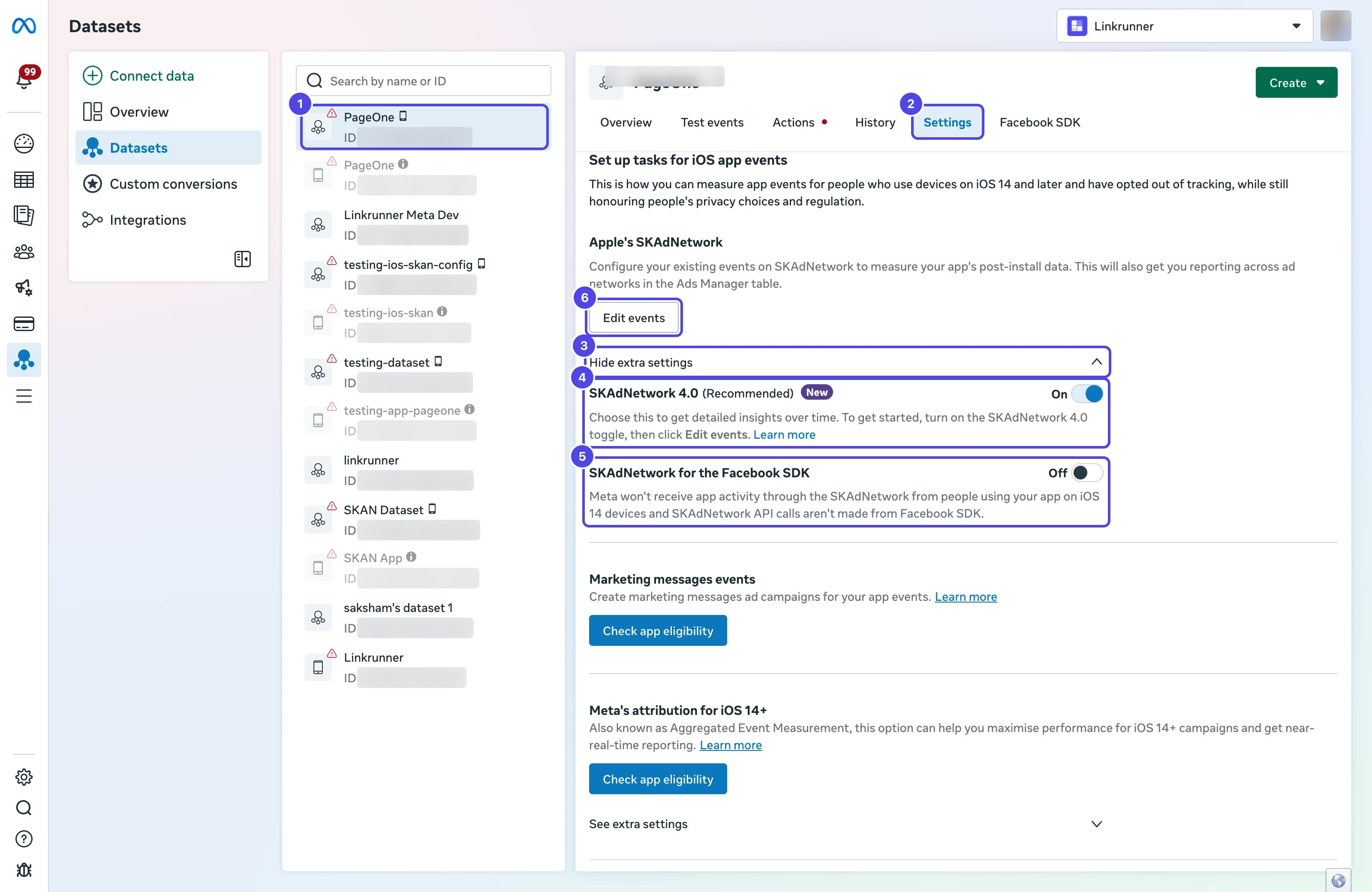
Switching between SKAdNetwork 4.0 and 3.0 can take at least 24 hours to apply. Avoid switching back and forth.
Edit events reopens your current setup, where Priority can show as text such as High instead of a
number you can type. To get the number field, click Edit, then Back until you reach Choose an app event
connection, click Change Method, and continue from Step 2.
Step 2: Choose Custom Integration
- On Choose how to configure events, select Customise. Linkrunner does not provide a schema URL for Import from partner app.
- Click Next
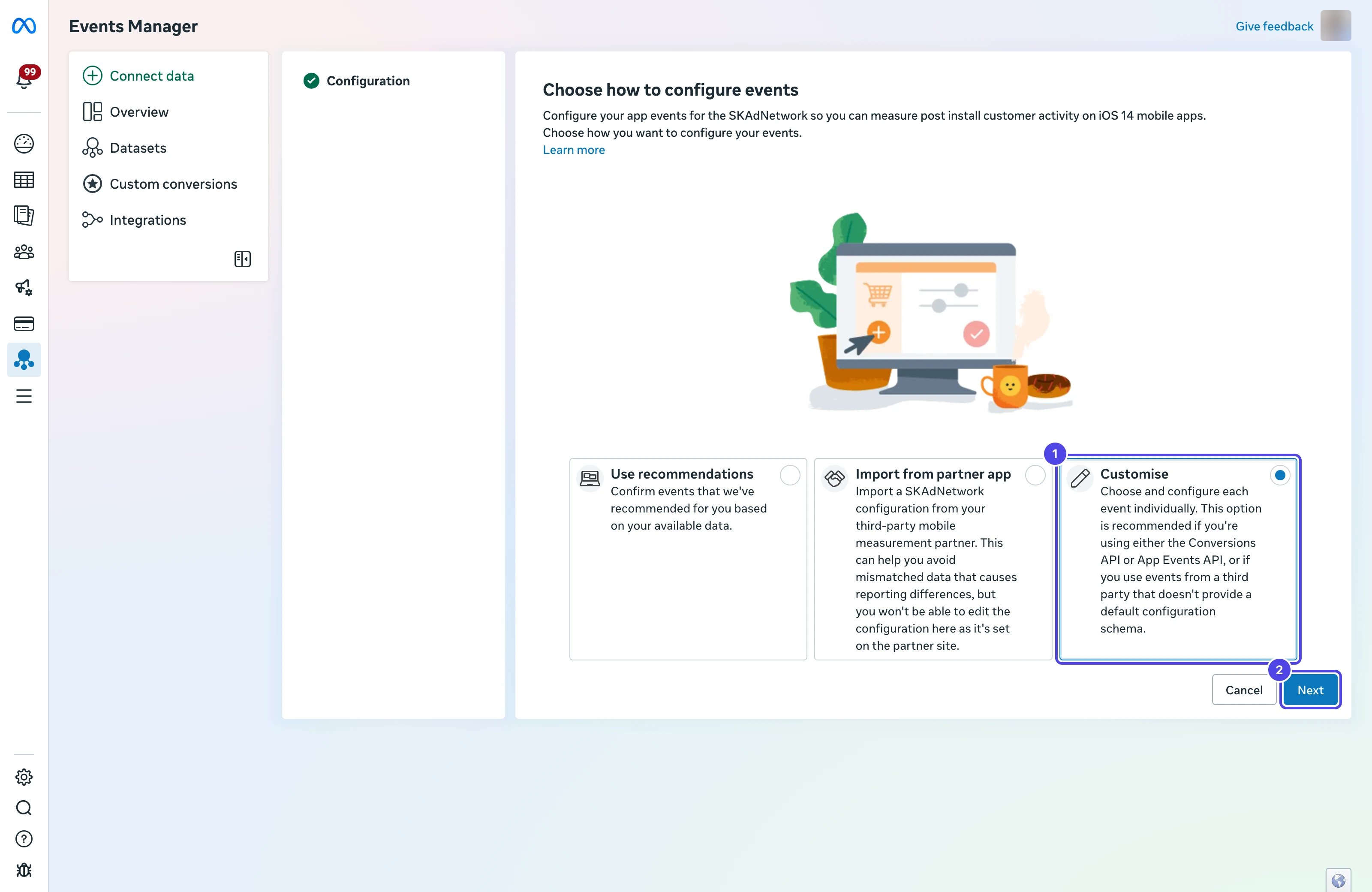
- On Choose an app event connection, select Custom integration for SKAdNetwork
- Check that your app meets the requirements listed on the card, then click Next
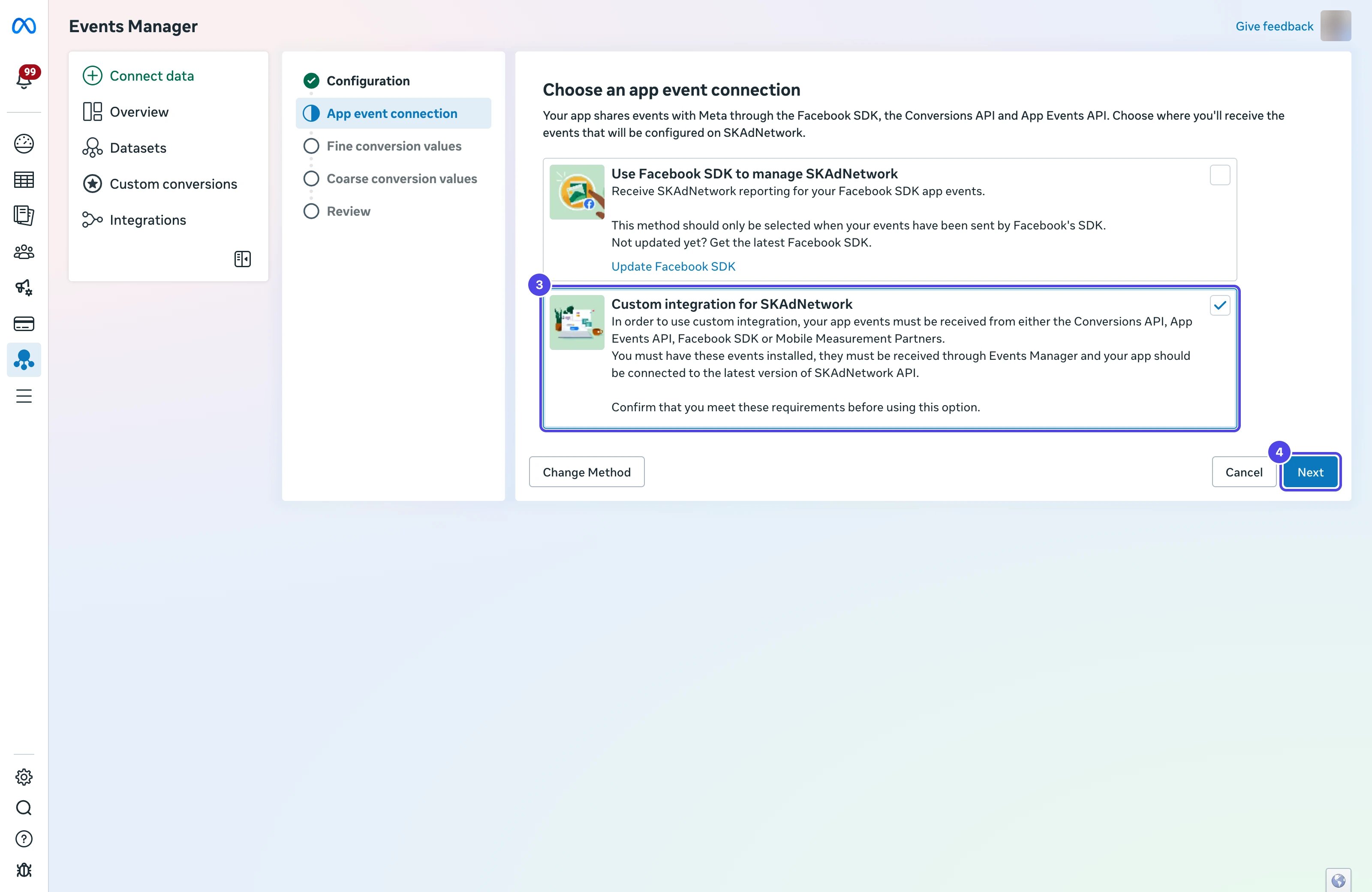
Step 3: Add the Fine Conversion Values
Recreate every row of Linkrunner’s Fine Conversion Values table. Your app reports the Priority number, and Meta credits the event you assign to that number, so the numbers must match Linkrunner’s exactly.- In Priority, type the row’s Priority number from Linkrunner
- In Event name, select the Meta event for that row
- If the Linkrunner row lists more than one event, click + under the event and add each one to the same row
- Click Add Event to add the next row. When every Linkrunner row is added, click Next
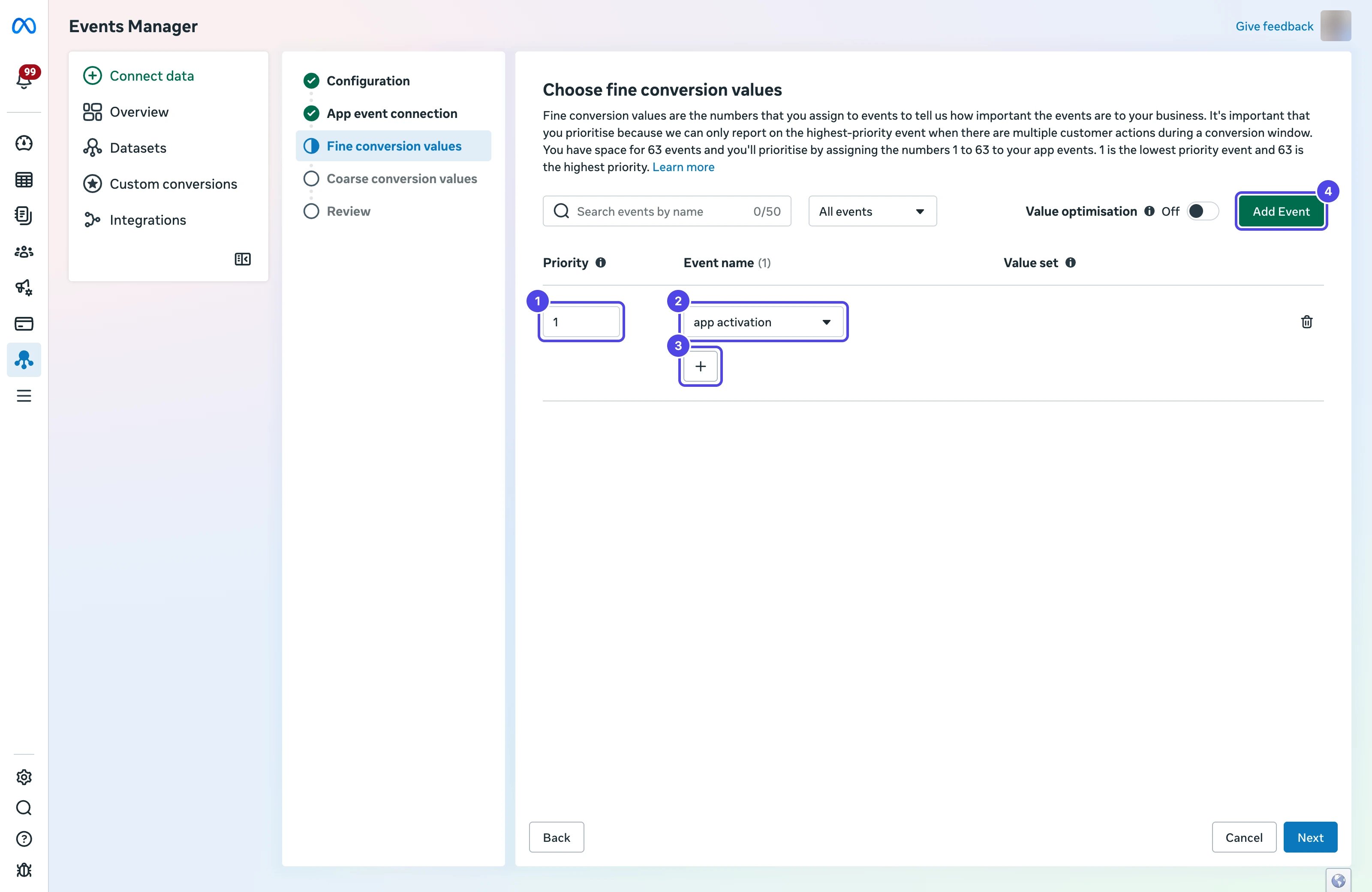
The dropdown only lists events Meta has received from your app in the past 90 days. If an event is missing, see
An event is missing from the Meta event list.
Step 4: Add the Coarse Conversion Values
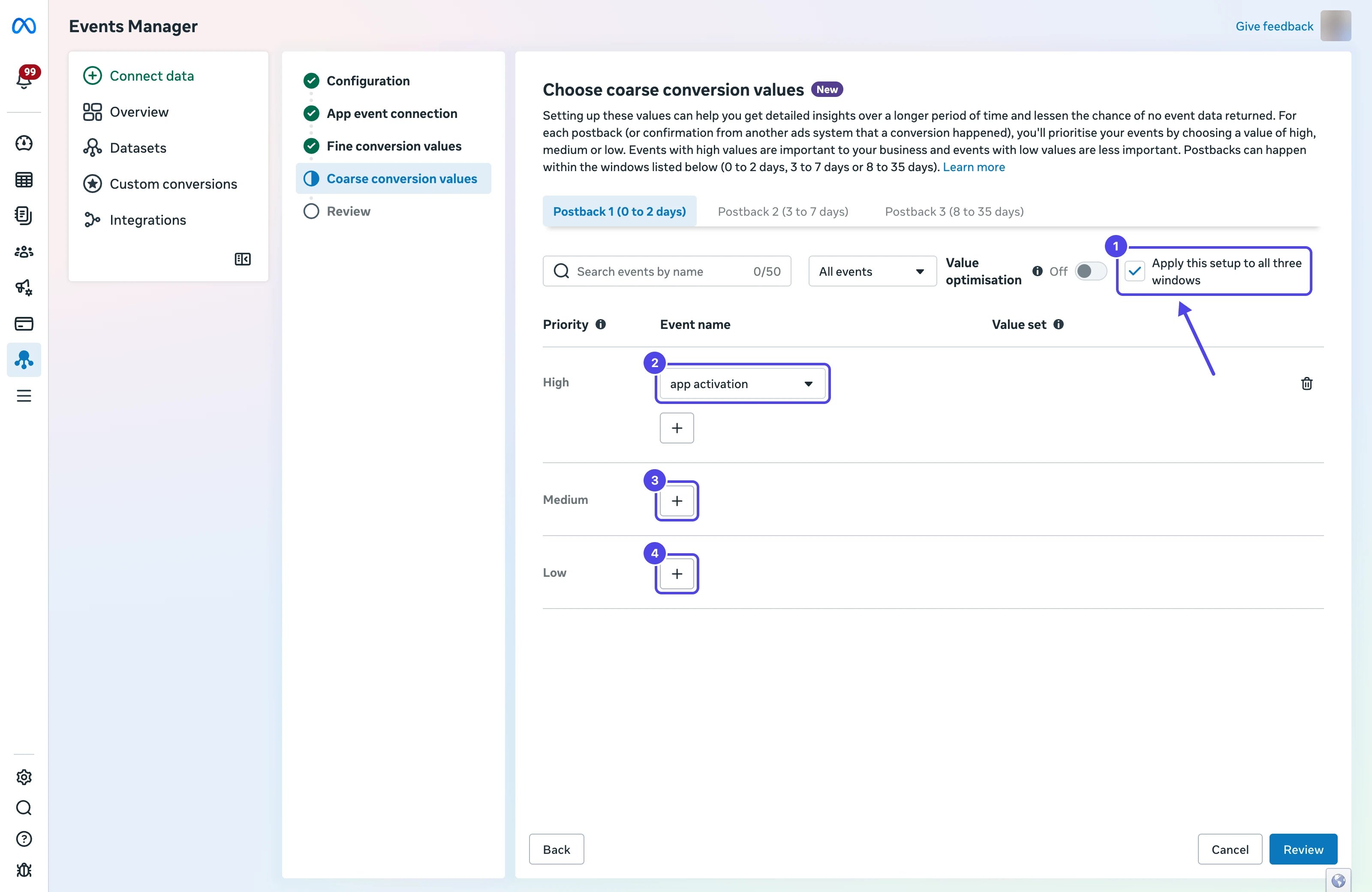
- Keep Apply this setup to all three windows checked. Linkrunner uses the same coarse mapping for all three postbacks.
- Select the event for High, matching Linkrunner’s Coarse Conversion Values tab
- Click + next to Medium and Low and select their events, then click Review
Step 5: Review and Apply
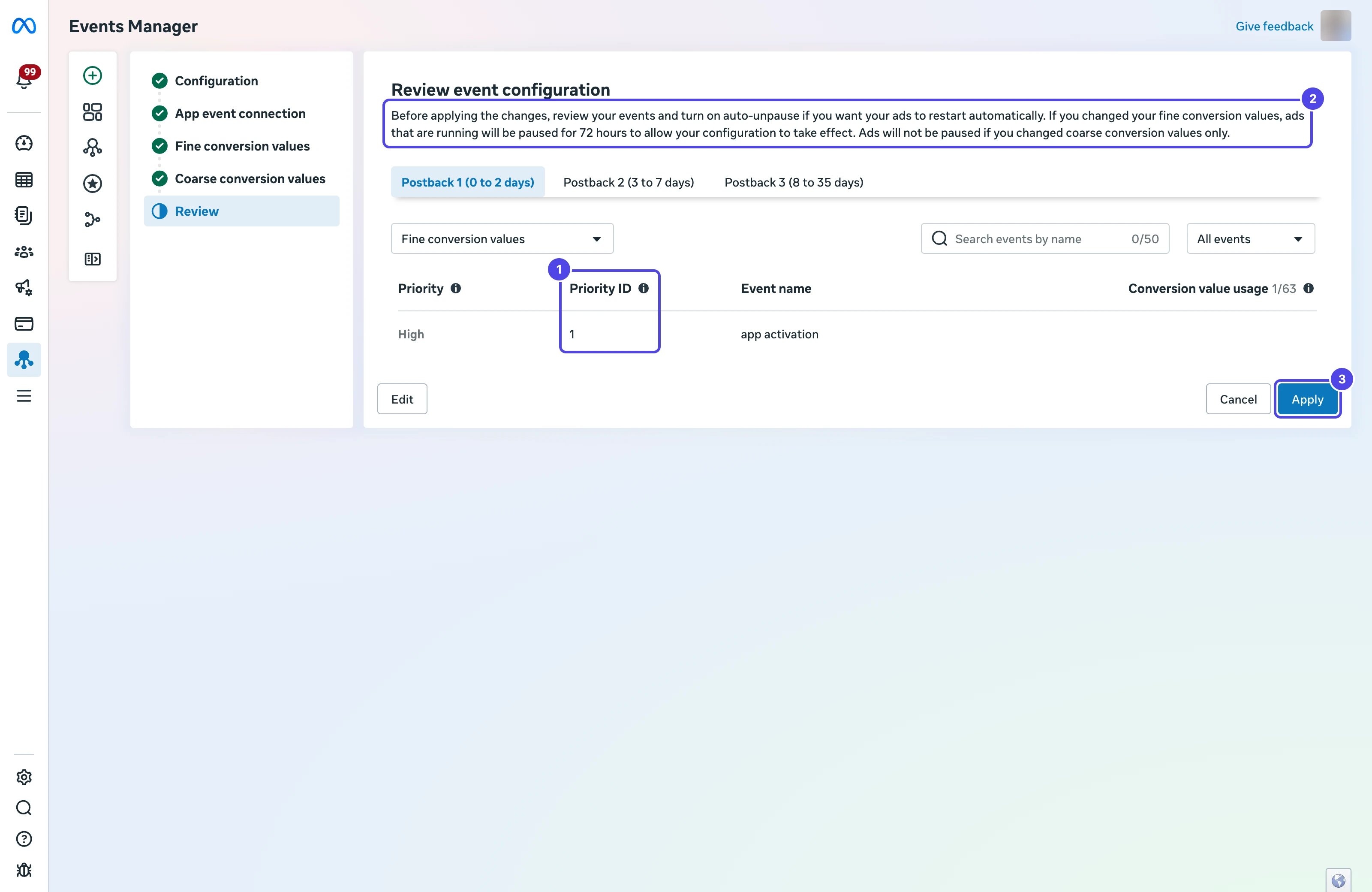
- Check each Priority ID in the review table against the Priority numbers in Linkrunner’s Fine Conversion Values table. They must match exactly.
- Read the notice at the top of the page. If Meta offers auto-unpause, turn it on if you want ads to restart automatically after the pause.
- Click Apply
5. Create an iOS Campaign in Meta Ads Manager
Start a campaign as described in Create Your First Campaign, with the App promotion objective. Then complete these SKAN-specific settings.Campaign Settings
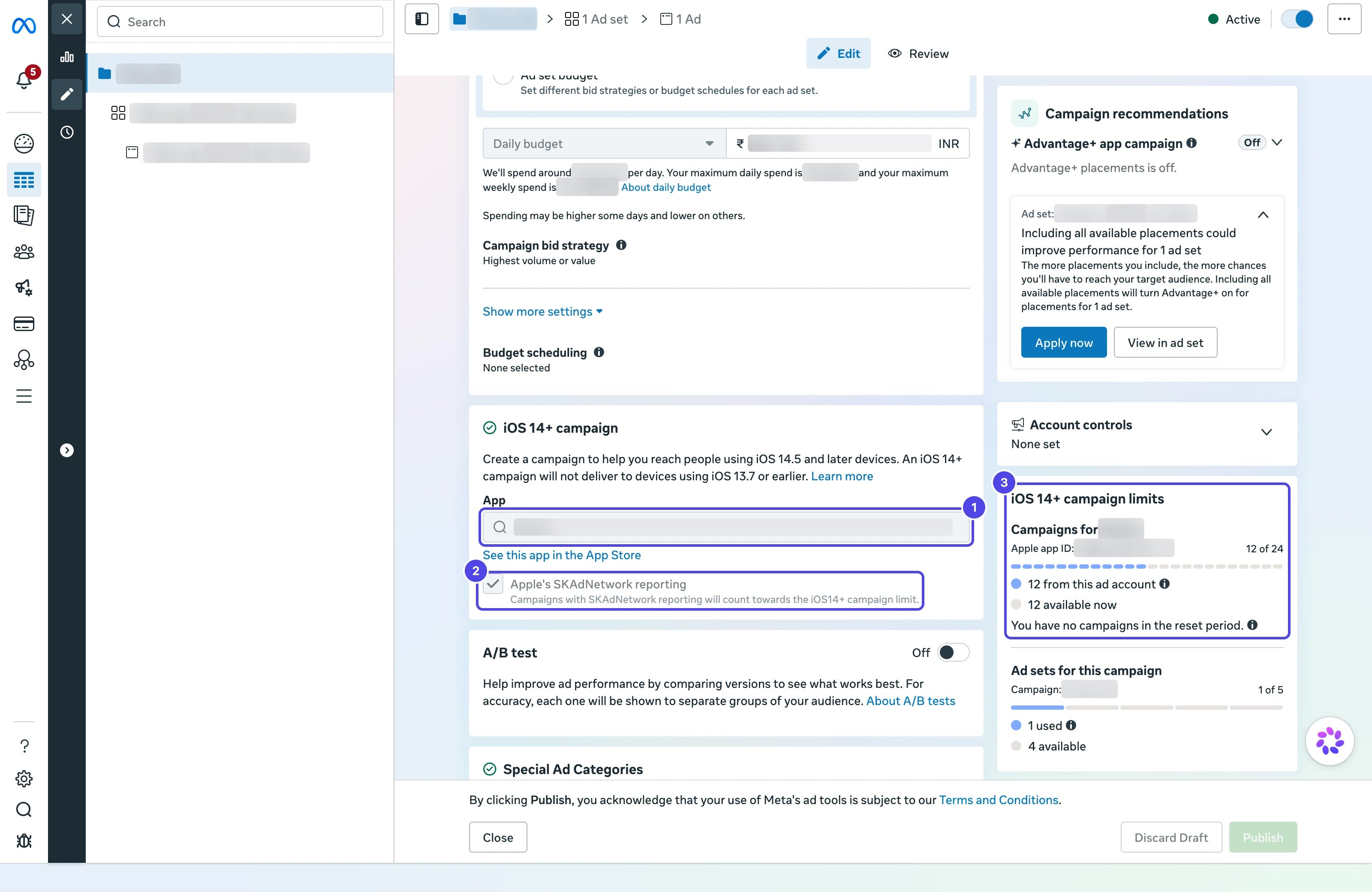
- In the iOS 14+ campaign section, select your app from the App Store under App
- Keep Apple’s SKAdNetwork reporting checked
- Check iOS 14+ campaign limits. Meta limits how many iOS 14+ campaigns can run for each app, and how many ad sets each campaign can have.
Ad Set Settings
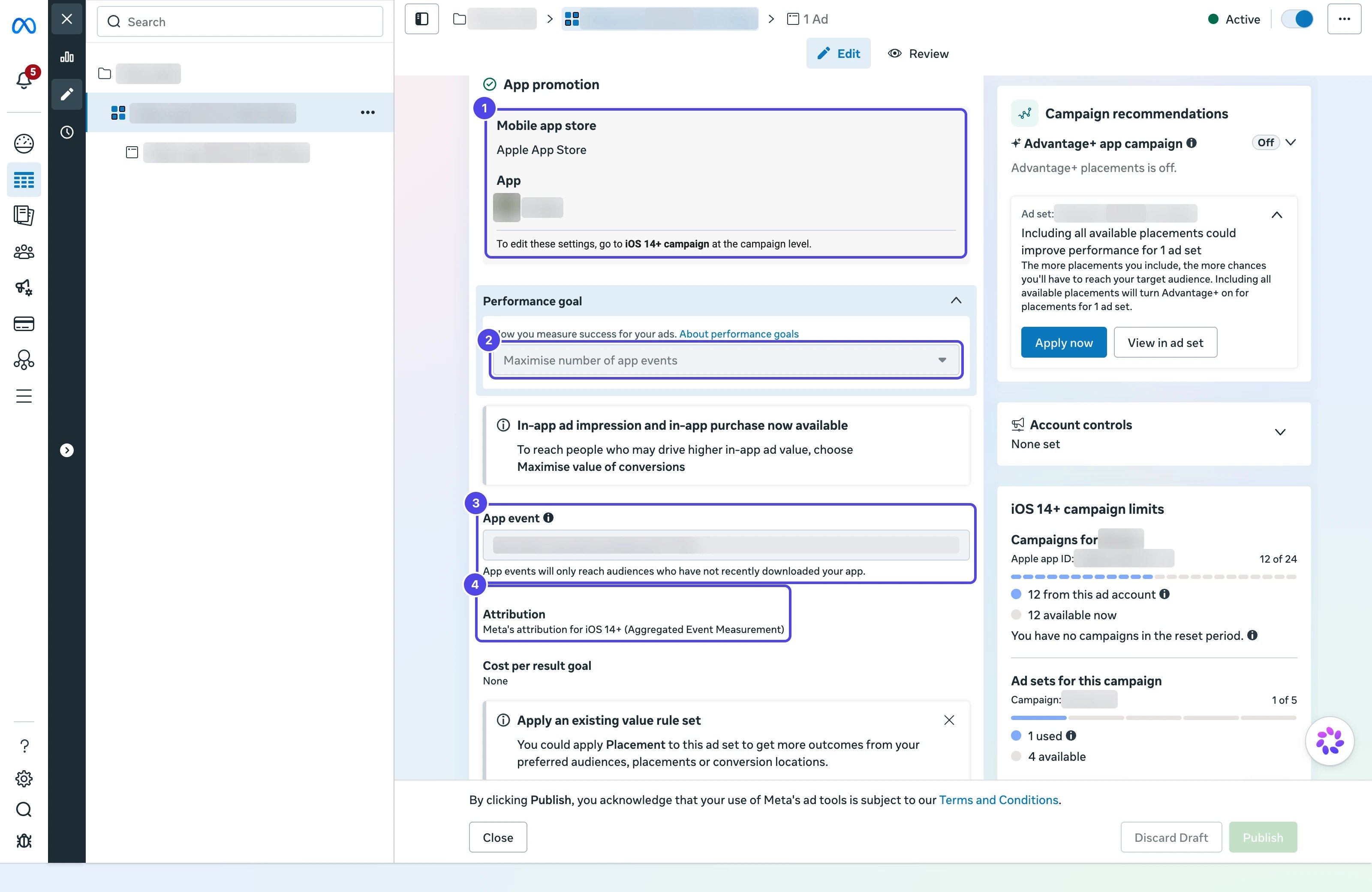
- Under App promotion, confirm Mobile app store shows Apple App Store and your app. You change these in the campaign’s iOS 14+ campaign section.
- Under Performance goal, select Maximise number of app events to optimize for an in-app event
- Under App event, select an event from your SKAN configuration. Meta marks events without a conversion value as inactive for campaign and ad set reporting.
- Review Attribution. It shows how Meta attributes this ad set. See Meta’s guide to Aggregated Event Measurement and SKAdNetwork before you change it.
6. Grant Access to Linkrunner (Optional)
If you want Linkrunner to configure the SKAN schema in Meta for you, share your app’s dataset with access@linkrunner.io in Meta Business Manager. Access to the ad account alone is not enough, because the SKAN settings live on the dataset.7. Verify the Setup
1
Check the checklist
Confirm every item is complete in the Meta SKAN Integration
Checklist.
2
Check the Meta configuration
In Meta Events Manager, open your dataset’s Settings tab and click Edit events. The Review step should
list the same events and priorities as Linkrunner’s Meta SKAN Configuration tab. Click Cancel to leave
without changes.
3
Run an iOS campaign
SKAN postbacks only flow once a Meta iOS App Promotion campaign is live and driving installs.
4
Watch the SKAN dashboard
Postbacks appear in the SKAN dashboard as Apple delivers them. Apple delays
postbacks by design, so expect data 24 to 48 hours after installs begin.
Troubleshooting
No postbacks in the SKAN dashboard
- Confirm SKAN is Enabled at the top of Settings → SKAN Setup
- Confirm the
Info.plistkeys from section 1 are in the live app build - Confirm the SKAN-ready SDK version is live and rolled out to 100% of users
- Wait 24 to 48 hours. Apple delays SKAN postbacks by design
An event is missing from the Meta event list
Meta only lists events it has received from your app in the past 90 days.- Open your dataset’s Overview tab in Meta Events Manager and select a longer date range to check whether Meta has received the event
- Confirm the event is mapped in Integrations → Meta Ads → Event Mapping
- Trigger the event from your app and wait for it to appear in Events Manager, then return to Edit events
Meta SKAN Configuration asks for event mappings
Map every event listed on that screen in Integrations → Meta Ads → Event Mapping, then reload Settings → SKAN Setup → Meta SKAN Configuration.Conversion values look wrong in Meta
- Confirm the Priority ID of each event in Meta’s Review step matches the Priority numbers in Settings → SKAN Setup → Meta SKAN Configuration
- Confirm you regenerated and re-entered the values after any schema change in Linkrunner
Meta still attributes via the Facebook SDK
- Confirm the SKAdNetwork for the Facebook SDK toggle is OFF for your dataset
- Confirm Custom integration for SKAdNetwork is selected under Edit events
Need help? Contact support@linkrunner.io