

getAttributionData() after the first app open.
A deferred deep link is not required for campaign attribution. It only controls the
deeplink value returned by the SDK. Meta campaign data can be present while deeplink is empty.Before you start
Complete these requirements before testing:- Configure your Meta App ID and Install Referrer Decryption Key in Meta App Integration.
- Add your Facebook App ID to
AndroidManifest.xml. See Meta Install Referrer. - Use a supported SDK version:
- Android SDK 3.5.2 or later
- Flutter SDK 3.6.2 or later
- React Native SDK 2.6.2 or later
- Use Facebook 428 or later, or Instagram 296 or later, on the test device.
- Make sure the Meta App ID in your app matches the Meta app used by the ad campaign.
- Make sure your Play Store release contains the Linkrunner SDK and Meta Install Referrer configuration.
- Implement
getAttributionData()for your SDK: Android, React Native, or Flutter.
1. Prepare a clean Android device
1
Record the device details
Record the device model and GAID. These values help Linkrunner identify the exact test requests if you need support.
2
Update the Meta app
Update Facebook or Instagram to a supported version, then sign in to the account that will receive the ad preview.
3
Uninstall your app
Remove your app before each test. This creates a new Linkrunner install instance when the app opens again.
2. Send the Meta ad preview to the device
Use a published App Promotion ad or inject an ad preview into Facebook or Instagram.1
Open the ad preview
In Meta Ads Manager, open the App Promotion ad and choose Share → Share a link.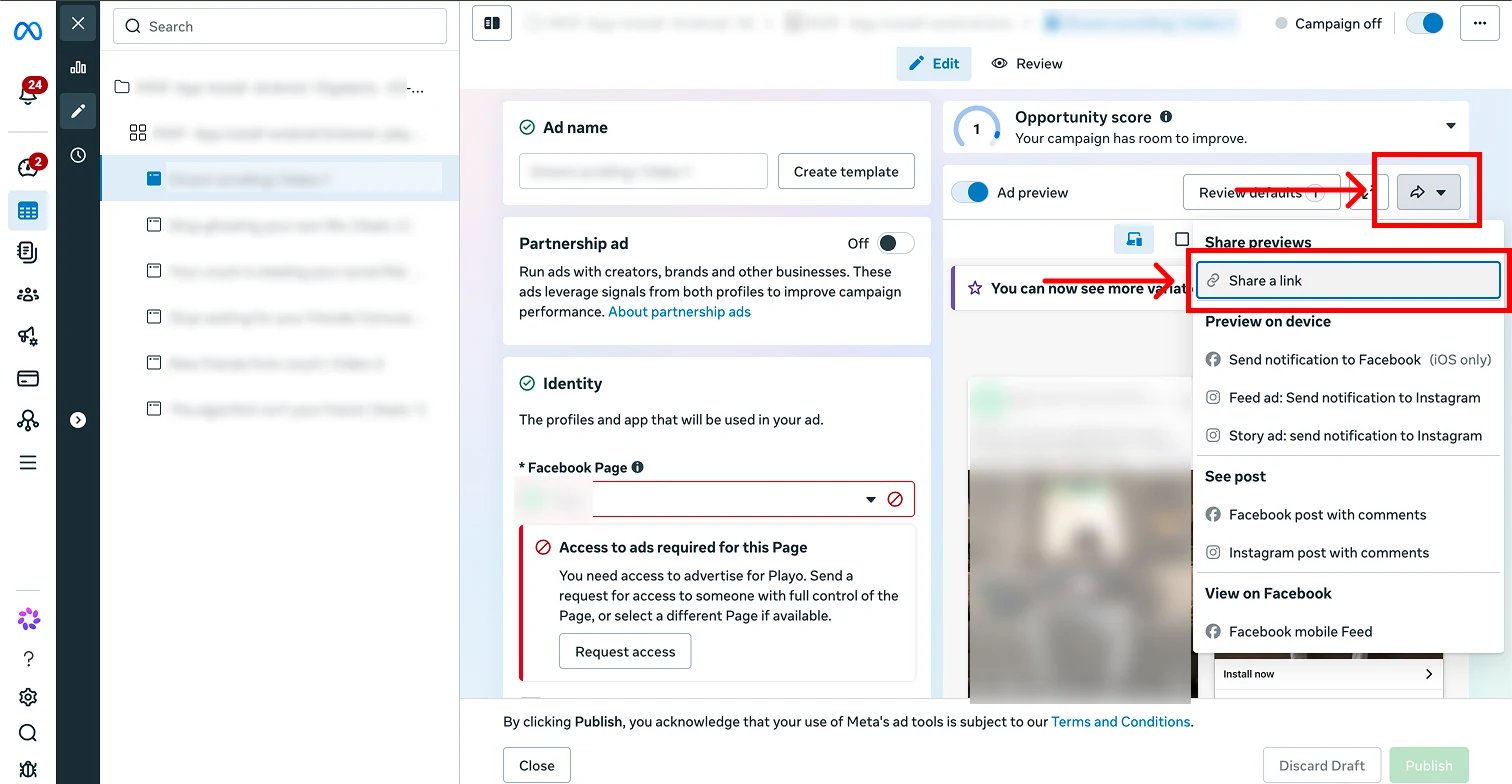
2
Open the share link
Open the preview link while signed in to Facebook. Select the placement you want to test.
3
Send the preview to the Meta app
For Facebook Feed, choose Options → Send notification to Facebook. For Instagram Feed, choose Options → Preview in Instagram app.
4
Open the ad inside Facebook or Instagram
Open the notification or preview in the Meta app. Tap the ad call to action from there.
If you are also testing a deferred deep link, save and publish it on the exact ad used for the test. Then wait up to 30 minutes for Linkrunner’s Meta creative sync. A value visible in the Ads Manager editor or preview does not confirm that Meta’s API exposes it to Linkrunner.
3. Install and open your app
1
Open the Play Store from the ad
Tap the ad call to action and continue to your app’s Google Play listing.
2
Install the app
Install the Play Store build that contains your Linkrunner integration.
3
Open the app once
Launch the app immediately after installation. The Linkrunner SDK reads the Meta Install Referrer and sends the install to Linkrunner during initialization.
4. Call getAttributionData()
Wait for init to complete, then call getAttributionData() once for the new install.
- Android
- React Native
- Flutter
init completes should return adNetwork: "META" with the campaign details for that install.
Expected response
The exact type depends on your SDK, but the result should contain these values:campaignData.adNetworkisMETA.campaignData.typeisINORGANIC.campaignData.namematches the Meta campaign.- The Meta campaign, ad set, and creative IDs match Ads Manager.
- The first
getAttributionData()call after the Meta install returns the campaign data.
An empty
deeplink does not mean attribution failed. It means the ad did not provide a deferred deep link. Campaign attribution is verified through campaignData.Troubleshooting
The first response is organic
- Confirm the app was uninstalled before you opened the injected ad.
- Confirm you tapped the ad inside Facebook or Instagram, not only in the browser preview.
- Confirm the Facebook App ID in
AndroidManifest.xmlmatches the Meta app used by the campaign. - Confirm the Install Referrer Decryption Key is correct in Linkrunner.
- Confirm
getAttributionData()runs afterinitcompletes. - Record the device model, GAID, app version, build number, and test timestamp before contacting support.
Campaign data is present but deeplink is empty
This is expected when the ad has no deferred deep link. If you expected one:
- Confirm the value was saved and published on the exact ad returned in
campaignData. - Wait up to 30 minutes for Linkrunner’s Meta creative sync before repeating the install test.
- Confirm the published ad, not only the Ads Manager editor or preview, exposes the deferred deep link.
The SDK cannot read Meta Install Referrer
- Update Facebook or Instagram on the device.
- Confirm at least one supported Meta app is installed.
- Confirm your app includes the Facebook App ID metadata.
- Confirm your SDK meets the minimum version requirement.