

Choose the right method
Usually send as a custom event
- Product view, search, add to cart, and checkout started
- Content view, level completion, and referral
- Purchase initiated when it only marks the start of checkout
- Payment failure shown for product analytics when you do not need a payment record
Usually send with capturePayment
- Completed purchase
- First or second payment
- One-time or recurring payment
- Subscription creation or renewal with a charge
- Wallet top-up or funds withdrawal
- A failed or cancelled transaction when you need it recorded with
PAYMENT_FAILEDorPAYMENT_CANCELLED
Before you test
- Complete the click → install → signup flow so the test user is attributed.
- Use the same
user_idthat your app registered throughsignup. - Generate a fresh
payment_idfor each real transaction. - Send
amountas a number in one reporting currency. - Pick one source for each payment, either the app SDK or your backend.
- For server-side tests, generate a server key from Settings → Data APIs.
Test flow
1
Create traceable test values
Use values that you can find in the Events Log:Use a new
payment_id every time you test a new transaction.2
Send a custom event control
Send a non-payment action such as A successful API request returns a captured-event response.
checkout_started through your SDK’s trackEvent method or the Event Capture API.3
Send a completed payment
Send the actual transaction through your SDK’s A successful API request returns HTTP
capturePayment method or the Revenue Tracking API.201.4
Verify both records in Linkrunner
Open Events → Events Log, then filter by your test user or event name.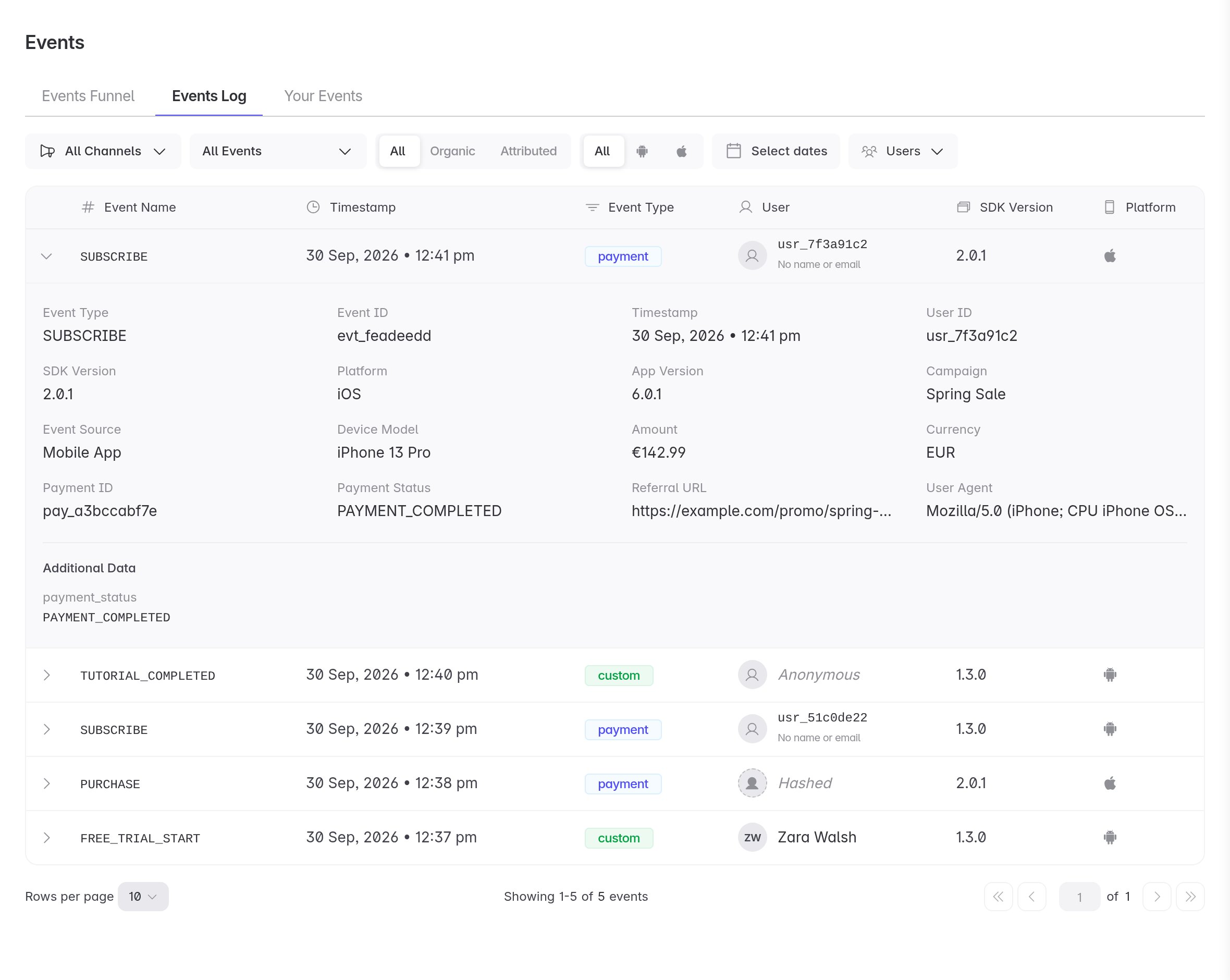
checkout_startedappears as a custom event.- The transaction appears as a payment event.
- The payment row contains the expected Amount, Payment ID, and Payment Status.
5
Verify payment deduplication
Send the same payment again with the same
type and payment_id.Expected result: the Events Log still contains one payment for that combination. Linkrunner records the first request and ignores later duplicates.6
Verify a new transaction
Send another completed payment with a new
payment_id, such as lr_test_payment_002.Expected result: the Events Log contains a second payment. If it does not, confirm that the new transaction did not reuse the previous payment_id.Expected classification
Test Meta Purchase forwarding
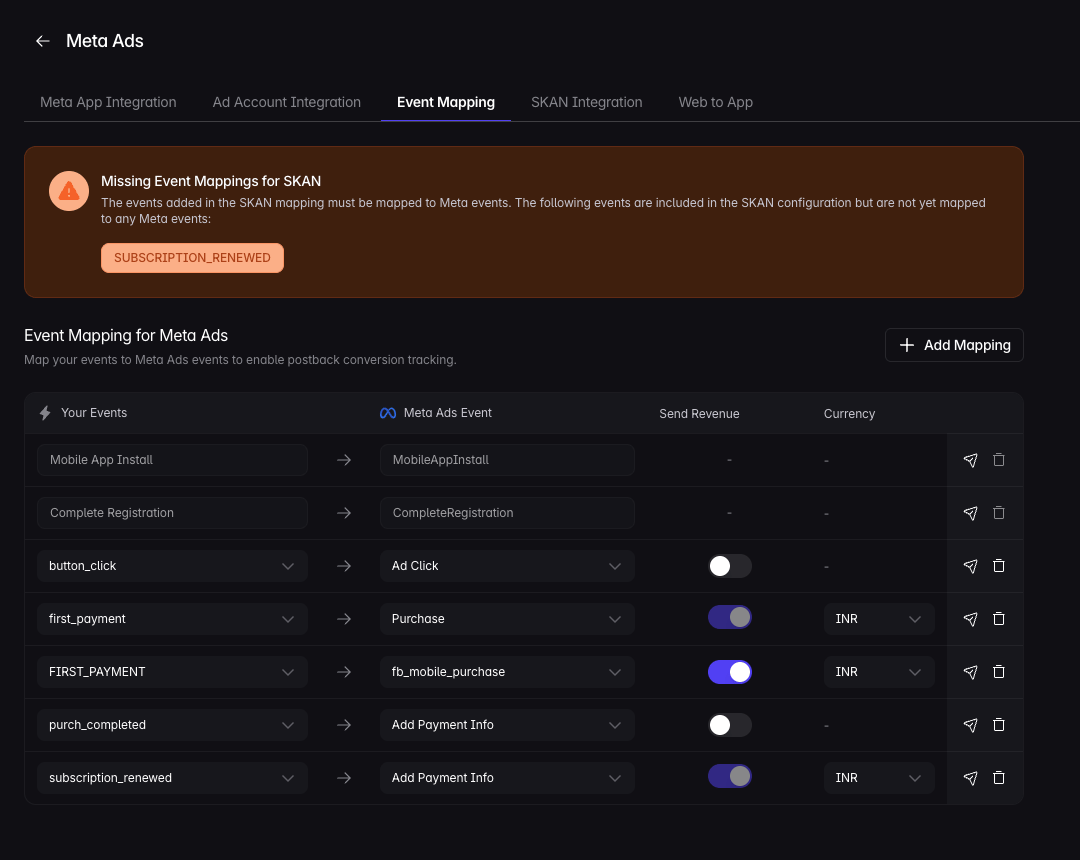
Use this section only when the payment must reach Meta Commerce Manager.- In Linkrunner, map the payment type you send, such as
DEFAULTorFIRST_PAYMENT, to Meta’s standardPurchaseevent. - Include the required
event_datafields forPurchase, including product IDs,contents,content_type,value,currency,num_items, andorder_id. - Send a new payment with a new
payment_id. - Check Meta Commerce Manager → Events. The real-time hit should appear within about 15 minutes. Full reporting can take a few days.
Test payment removal
Remove one test payment using itspayment_id:
The API does not define a partial-refund adjustment flow. Contact support before using
removePayment for a partial refund.Troubleshooting
Nothing appears in the Events Log
Nothing appears in the Events Log
Confirm the device completed the attribution test flow and that the event uses the same
user_id registered through signup.The purchase appears as a custom event
The purchase appears as a custom event
The app or backend sent it through
trackEvent or /capture-event. Send authoritative transactions through capturePayment or /capture-payment instead.A new payment is missing
A new payment is missing
Check whether it reused the same
type and payment_id as an earlier transaction. Linkrunner treats that combination as a duplicate.The same payment appears more than once
The same payment appears more than once
Confirm the app and backend are not both sending the transaction with different payment IDs. Choose one source, or use the same stable payment ID for safe retries.
The payment status did not change
The payment status did not change
Linkrunner keeps the first record for a
type and payment_id combination. Send the final payment state once instead of sending initiated and completed states with the same combination.Meta does not show the Purchase event
Meta does not show the Purchase event
Confirm the payment type is mapped to
Purchase, the ecommerce payload includes every required field, and the test has had at least 15 minutes to reach Meta Events Manager.