

What a finance member can do
A finance member sees one page in the dashboard: Usage & Billing. On it, they can:- View install usage for the project
- View and download invoices
- Pay invoices, by bank transfer or payment link
- Add or update the billing details, such as company name, address and GSTIN
- Use the Linkrunner Wallet, if your account has it enabled
- A new invoice is ready
- Payment reminders and overdue notices
- Payment received, with the receipt
- A wallet recharge is approved
- Account access is restricted or restored
- Requests for GST details
What a finance member cannot see
Every other page is hidden, including campaigns, attribution, users, events, integrations, members and project settings. If a finance member opens a link to one of these pages, the dashboard sends them back to Usage & Billing. The page tells them they have the Finance role and that a project admin can change their access.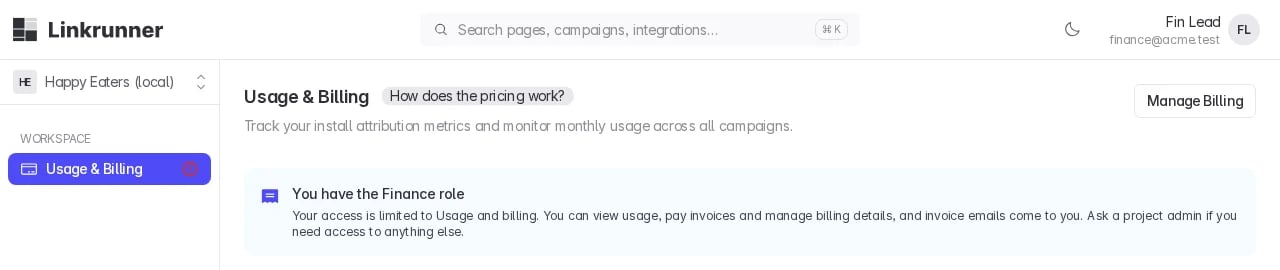
Add a finance member
Only project admins can add a finance member or change someone’s role to Finance.1
Open Members
Go to Settings → Members and click Invite.
2
Enter their email and choose Finance
Enter one or more email addresses, set Role to Finance, and click Add.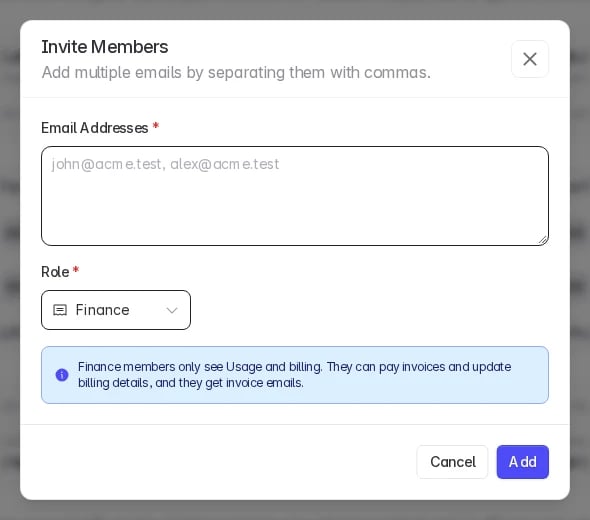
3
They sign in
They get an email invitation. When they sign in, they land on Usage & Billing.
Good to know
- Access is per project. Add the finance member to each project they should manage billing for.
- Invoices cover the whole billing account. If several projects share one billing account, a finance member on any of those projects receives the billing emails for the account.
- To remove access, delete the member from Settings → Members.