

Before you start
You need:- Campaigns → Edit turned on for your agency. It is the same switch that lets you create links. See Ask the customer to turn on link creation.
- A campaign you can see in All Campaigns. By default that is only the campaigns your agency created. If the customer limited you to certain networks, it is only campaigns on those networks.
1. Open the campaign
1
Open the customer's project
Sign in to Linkrunner Dashboard and pick the customer’s project from the project picker.
2
Open the campaign
Open All Campaigns and click the campaign row.
3
Click Edit
Edit is at the top right of the campaign panel.
2. Change the details
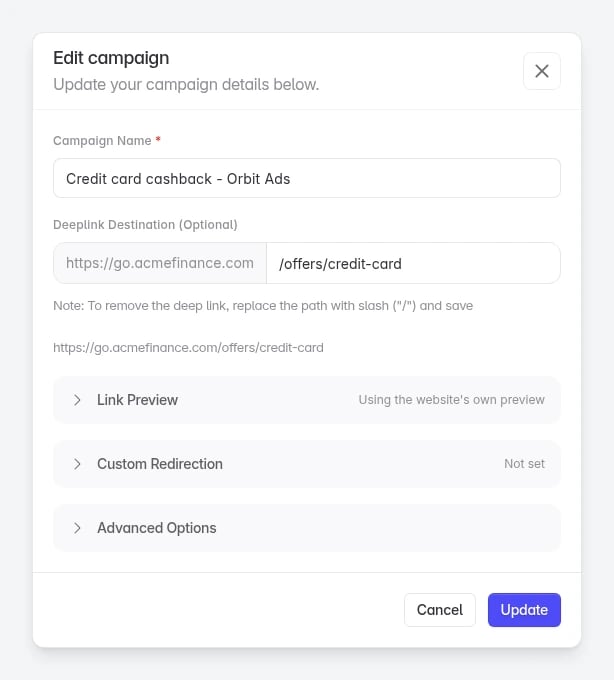
The form uses the same fields as Create Link. See Create a trackable link for what each one does.
3. Save
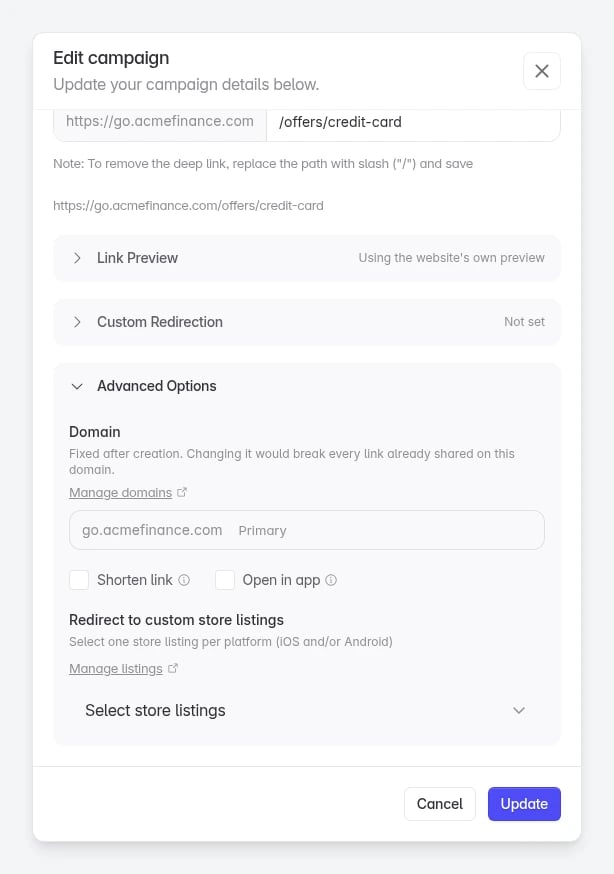
Click Update. You see Campaign updated successfully.What you can’t change
Troubleshooting
"You can't make this change"
The customer has not let your agency edit this campaign.
"You can't make this change"
The customer has not let your agency edit this campaign.
Either Campaigns → Edit is off for your agency, or the campaign is outside the networks or campaigns the customer shares with you. Ask the customer to check your agency’s access in Settings → Members. See Control agency access.
The campaign is not in your list
It is outside what the customer shares with you.
The campaign is not in your list
It is outside what the customer shares with you.
By default you only see campaigns your agency created. Ask the customer to turn off Only campaigns they built if you need to edit their other campaigns.
"Deep Link Error"
Linkrunner could not read the destination.
"Deep Link Error"
Linkrunner could not read the destination.
Enter only the path, for example
/offers/credit-card, with no spaces. The domain in front of it is fixed.You need to switch off or delete the campaign
Only the customer's team can do this.
You need to switch off or delete the campaign
Only the customer's team can do this.
You may see Delete or Link status in the form, but they don’t work for an agency. Ask the customer to do it from their own dashboard. See Deactivate a campaign link.A link with an ad channel, such as one built for an affiliate, can’t be turned off or deleted by anyone. Stop sending traffic to it instead.