

What you can change
Renaming changes only the name shown in the dashboard. Your link, its
c value, your macros and your postbacks stay the same, and past clicks and installs stay on the campaign.
Rename a campaign
1
Open the campaign
Sign in to Linkrunner Dashboard, pick the advertiser project, open All Campaigns and click the campaign row.
2
Click Edit
Edit is at the top right of the campaign panel.
3
Enter the new name
Change Campaign Name and click Update. You see Campaign updated successfully, and the new name shows in All Campaigns.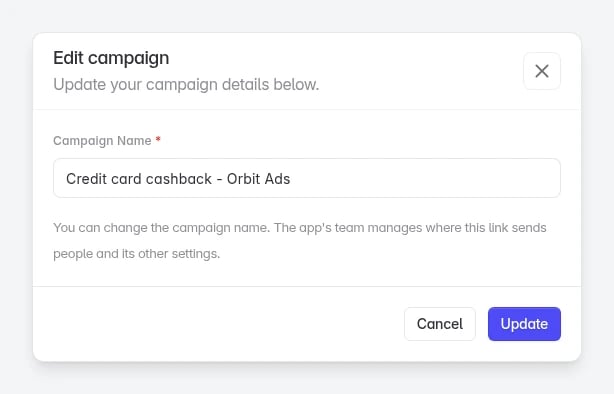
Troubleshooting
You need to change the deep link, redirects or another setting
Only the advertiser's team can change these.
You need to change the deep link, redirects or another setting
Only the advertiser's team can change these.
Ask the advertiser’s project admin to make the change. They edit the same campaign from their own dashboard.
"You can't make this change"
The campaign is no longer credited to you.
"You can't make this change"
The campaign is no longer credited to you.
You can only rename campaigns credited to you. Reload the page. If the campaign is still in All Campaigns and the error repeats, contact support.
The campaign has the wrong ad channel
The ad channel can't be changed after the link is created.
The campaign has the wrong ad channel
The ad channel can't be changed after the link is created.
Create a new link from All Campaigns → Create Link. See Create a campaign link.
The campaign is not in your list
You can only edit campaigns attributed to you.
The campaign is not in your list
You can only edit campaigns attributed to you.
The campaign belongs to the advertiser or another partner. Only campaigns that credit you appear in All Campaigns, and only those can be renamed.