> ## Documentation Index
> Fetch the complete documentation index at: https://docs.linkrunner.io/llms.txt
> Use this file to discover all available pages before exploring further.
# Webhooks
> Receive real-time notifications when attribution events occur
**Using an AI coding agent?** Have it write your webhook receiver for you:
```bash theme={null}
npx @linkrunner/skills add webhooks
```
The skill generates a handler for your backend that verifies the `linkrunner-key` header and processes install/signup payloads. See [Linkrunner Agent Skills](/ai-agent-skills).
## Overview
Webhooks allow you to receive real-time HTTP notifications when attribution events occur in your app. When a user installs your app or signs up, Linkrunner sends a POST request to your configured endpoint with detailed attribution data.
**Common use cases:**
* Server-side analytics and reporting
* CRM integration for user onboarding
* Real-time Slack notifications
* Custom attribution pipelines
## Configuration
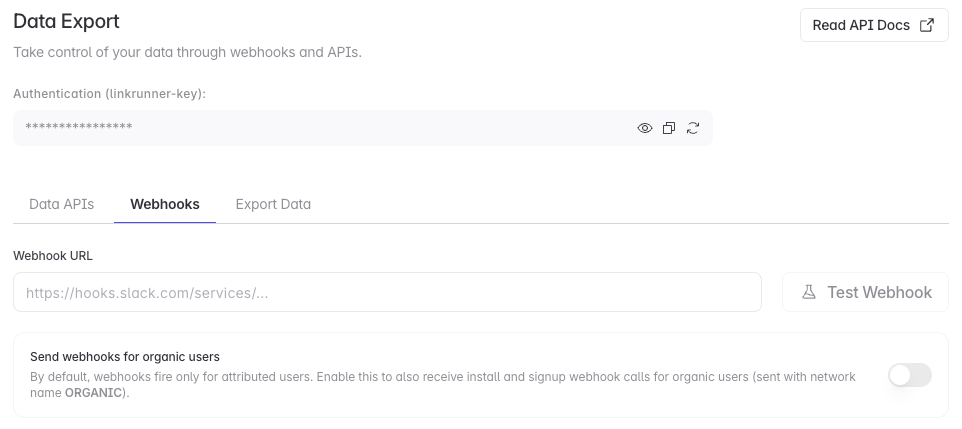 In the dashboard, go to **Settings → Data Export**, then select the **Webhooks** tab. You can also [open Webhook settings directly](https://dashboard.linkrunner.io/settings?s=webhooks).
Enter your public webhook URL, then click **Update Webhook**.
Click **Test Webhook**. Your endpoint must accept JSON POST requests and return a direct 2xx response.
Turn on **Send webhooks for organic users** to receive install and signup webhooks for organic users. These payloads use `network_name: "ORGANIC"`.
Your endpoint must be publicly accessible. Linkrunner retries failed requests up to three times, but does not follow redirects.
## Webhook Events
Linkrunner sends webhooks for the following events:
| Event | Description |
| --------- | --------------------------------------------------------------------------- |
| `install` | Triggered when an app install is attributed to a campaign or organic source |
| `signup` | Triggered when a user signup event is recorded via the SDK |
### Install Webhook
The `install` webhook is triggered immediately when Linkrunner attributes an app installation. At this point, your app has just been opened for the first time and the user hasn't had a chance to sign up or log in yet. Because of this, user identity fields such as `user_id`, `name`, `phone`, `email`, and `additional_data` are only included in signup webhooks.
By default, install webhooks fire only for attributed (paid) installs. To also receive webhooks for organic users, enable **Send webhooks for organic users** in [Settings → Webhooks](https://dashboard.linkrunner.io/settings?s=webhooks). This covers both install and signup webhooks. Organic webhooks are sent with `network_name` set to `ORGANIC`, `ad_channel` set to `null`, and no campaign details.
However, the install webhook does include device identifiers (`gaid` for Android, `idfa` for iOS) when available. You can use these to match the install with the user later when they sign up.
Use the install webhook for:
* Tracking install counts by campaign
* Analyzing attribution data (network, ad creative, etc.)
* Monitoring app store conversion rates
* Storing device IDs to link with user accounts later
### Signup Webhook
The `signup` webhook is triggered when you call the `.signup()` method in your app via the Linkrunner SDK. This happens after the user has signed up or logged in, so the `user_id` field will contain the ID you passed to the SDK.
The signup webhook includes device identifiers (`gaid`/`idfa`) along with the `user_id`, giving you a complete picture of both the device and the user. It also includes user identity fields (`name`, `phone`, `email`) and any custom parameters you passed via `additional_data`, such as referral codes or other custom key-value pairs.
Like install webhooks, signup webhooks fire only for attributed users by default. Enabling **Send webhooks for organic users** also delivers signup webhooks for organic users, with `network_name` set to `ORGANIC` and no campaign details.
Use the signup webhook for:
* Linking attribution data to your user records
* CRM integration and user onboarding flows
* Calculating signup conversion rates from installs
* Forwarding custom parameters (e.g., referral codes) to your backend
To receive signup webhooks, you must call `.signup()` in your app after the user signs up or logs in. See your SDK's usage guide for implementation details.
## Payload Structure
All webhooks are sent as POST requests with a JSON body.
### Headers
| Header | Description |
| ---------------- | --------------------------------------------- |
| `Content-Type` | `application/json` |
| `linkrunner-key` | Your project's private key for authentication |
### Body Parameters
| Field | Type | Description |
| -------------------------- | ------------------------- | --------------------------------------------------------------------------- |
| `event_type` | `"install"` \| `"signup"` | The type of attribution event |
| `user_id` | `string` \| `null` | Customer user ID for signup webhooks |
| `campaign_id` | `string` | Unique identifier for the campaign |
| `campaign_name` | `string` \| `null` | Human-readable campaign name |
| `network_name` | `string` \| `null` | Attribution network: `ORGANIC`, `META`, `GOOGLE`, etc. |
| `ad_channel` | `string` \| `null` | Ad channel: `META`, `GOOGLE`, `TIKTOK`, `APPLE_SEARCH_ADS`, etc. |
| `attributed_on` | `ISO 8601 date` | Timestamp when attribution occurred |
| `installed_at` | `ISO 8601 date` \| `null` | Timestamp of app installation |
| `store_click_at` | `ISO 8601 date` \| `null` | Timestamp of store redirect click |
| `link` | `string` | The campaign link URL |
| `app_version` | `string` \| `null` | Installed app version |
| `gaid` | `string` \| `null` | Google Advertising ID (Android) |
| `idfa` | `string` \| `null` | Identifier for Advertisers (iOS) |
| `name` | `string` \| `null` | User's name (from `user_data.name` passed to the SDK) |
| `phone` | `string` \| `null` | User's phone number (from `user_data.phone` passed to the SDK) |
| `email` | `string` \| `null` | User's email address (from `user_data.email` passed to the SDK) |
| `additional_data` | `object` \| `null` | Custom parameters and device data (from the `data` field passed to the SDK) |
| `meta_campaign_details` | `object` \| `null` | Meta Ads campaign details (see below) |
| `google_campaign_details` | `object` \| `null` | Google Ads campaign details (see below) |
| `apple_search_ads_details` | `object` \| `null` | Apple Search Ads campaign details (see below) |
| `campaign_details` | `object` \| `null` | Generic ad network campaign details (see below) |
The `name`, `phone`, and `email` fields are populated from `user_data` passed to the SDK's `.signup()` or `.trigger()` methods.\
The `additional_data` field is populated from the SDK `data` object.\
Fields that are not available can be `null` or omitted from the payload.
### Meta Campaign Details
When the attribution is from Meta Ads, `meta_campaign_details` contains:
| Field | Type | Description |
| --------------------- | ------------------- | ----------------------------------------- |
| `ad_creative_id` | `string` \| `null` | Meta ad creative ID |
| `ad_creative_name` | `string` \| `null` | Ad creative name |
| `ad_set_id` | `string` \| `null` | Ad set ID |
| `ad_set_name` | `string` \| `null` | Ad set name |
| `campaign_group_id` | `string` \| `null` | Campaign group ID |
| `campaign_group_name` | `string` \| `null` | Campaign group name |
| `account_id` | `string` \| `null` | Meta Ads account ID |
| `ad_objective_name` | `string` \| `null` | Campaign objective (e.g., `APP_INSTALLS`) |
| `is_instagram` | `boolean` \| `null` | Whether the ad was on Instagram |
| `publisher_platform` | `string` \| `null` | Platform where ad was shown |
| `platform_position` | `string` \| `null` | Placement position |
### Google Campaign Details
When the attribution is from Google Ads, `google_campaign_details` contains:
| Field | Type | Description |
| --------------- | ------------------ | -------------------------------------- |
| `gclid` | `string` \| `null` | Google Click ID |
| `gbraid` | `string` \| `null` | Google app campaign tracking parameter |
| `ga_source` | `string` \| `null` | Google Analytics source |
| `ad_group_id` | `string` \| `null` | Ad group ID |
| `ad_group_name` | `string` \| `null` | Ad group name |
### Apple Search Ads Details
When the attribution is from Apple Search Ads, `apple_search_ads_details` contains:
| Field | Type | Description |
| ------------------- | ------------------ | ------------------------------------- |
| `ad_group_id` | `string` \| `null` | Apple Search Ads ad group ID |
| `ad_group_name` | `string` \| `null` | Ad group name |
| `keyword_id` | `string` \| `null` | Keyword ID |
| `keyword_name` | `string` \| `null` | Keyword name |
| `ad_id` | `string` \| `null` | Ad creative ID |
| `ad_name` | `string` \| `null` | Ad creative name |
| `country_or_region` | `string` \| `null` | Country or region for the attribution |
### Campaign Details
For supported non-Meta and non-Google ad networks, `campaign_details` contains:
| Field | Type | Description |
| ----------------- | ------------------ | -------------------------------------- |
| `ad_network_code` | `string` \| `null` | Internal ad network code |
| `ad_network_name` | `string` \| `null` | Ad network name |
| `campaign_id` | `string` \| `null` | Network campaign ID, when available |
| `adset_id` | `string` \| `null` | Network ad set ID, when available |
| `ad_creative_id` | `string` \| `null` | Network ad creative ID, when available |
### Additional Data
The `additional_data` object contains custom parameters and device data passed through the SDK. This is useful for forwarding arbitrary key-value pairs like referral codes or custom identifiers through the attribution flow.
Example:
```json theme={null}
{
"id": "user_123",
"name": "Test User",
"email": "test@example.com",
"phone": "9876543210",
"device_data": {},
"referral_code": "ABC123",
"custom_param_name": "custom_value"
}
```
## Example Payloads
### Install Event
```json theme={null}
{
"event_type": "install",
"campaign_id": "camp_XYZ123",
"ad_channel": "META",
"network_name": "META",
"app_version": "2.4.1",
"campaign_name": "Summer Promotion 2023",
"attributed_on": "2026-03-24T08:11:00.464Z",
"installed_at": "2026-03-24T08:11:00.464Z",
"store_click_at": "2026-03-24T08:11:00.464Z",
"link": "https://dl.linkrunner.io/?c=camp_XYZ123",
"meta_campaign_details": {
"ad_creative_id": "cr_987654321",
"ad_creative_name": "Summer Sale Creative",
"ad_set_id": "as_12345",
"ad_set_name": "Mobile Users Segment",
"campaign_group_id": null,
"campaign_group_name": null,
"account_id": "acc_1122334455",
"ad_objective_name": "APP_INSTALLS",
"is_instagram": null,
"publisher_platform": "facebook",
"platform_position": "feed"
},
"google_campaign_details": null,
"apple_search_ads_details": null,
"campaign_details": null,
"gaid": "bk9384xs-p449-96ds-r132",
"idfa": null
}
```
### Install Event (Organic)
Sent only when **Send webhooks for organic users** is enabled:
```json theme={null}
{
"event_type": "install",
"campaign_id": "",
"ad_channel": null,
"network_name": "ORGANIC",
"app_version": "2.4.1",
"campaign_name": null,
"attributed_on": "2026-03-24T08:11:00.464Z",
"installed_at": "2026-03-24T08:11:00.464Z",
"store_click_at": null,
"link": null,
"meta_campaign_details": null,
"google_campaign_details": null,
"apple_search_ads_details": null,
"campaign_details": null,
"gaid": "bk9384xs-p449-96ds-r132",
"idfa": null
}
```
### Signup Event
```json theme={null}
{
"event_type": "signup",
"user_id": "test_user_webhook_002",
"campaign_id": "OgWmhiSXhG",
"ad_channel": "META",
"network_name": "META",
"app_version": "1.0.0",
"campaign_name": "TOF - Free trial - AAA - DSDT - 17/12",
"attributed_on": "2026-03-25T15:52:00.007Z",
"installed_at": "2025-12-30T12:34:29.742Z",
"store_click_at": null,
"link": "https://dl.linkrunner.io/?c=OgWmhiSXhG&utm_source=meta_ads",
"meta_campaign_details": null,
"google_campaign_details": null,
"apple_search_ads_details": null,
"campaign_details": null,
"gaid": "5faa2433-d7e1-4a8e-9a1c-a5880c26ab5c",
"idfa": null,
"name": "Test User",
"phone": "9876543210",
"email": "test@example.com",
"additional_data": {
"id": "test_user_webhook_002",
"name": "Test User",
"email": "test@example.com",
"phone": "9876543210",
"device_data": {},
"referral_code": "ABC123",
"custom_param_name": "custom_value"
}
}
```
## Authentication
Every webhook request includes a `linkrunner-key` header containing your project's private key. Use this to verify that requests are genuinely from Linkrunner.
```javascript theme={null}
// Example: Verifying the webhook key
const PRIVATE_KEY = process.env.LINKRUNNER_PRIVATE_KEY;
app.post('/webhook', (req, res) => {
const receivedKey = req.headers['linkrunner-key'];
if (receivedKey !== PRIVATE_KEY) {
return res.status(401).json({ error: 'Unauthorized' });
}
// Process the webhook...
res.status(200).json({ received: true });
});
```
Never expose your private key in client-side code. Store it securely as an environment variable.
## Slack Integration
Linkrunner automatically formats webhook payloads for Slack when your URL contains `hooks.slack.com`. Instead of raw JSON, Slack receives a rich Block Kit formatted message displaying:
* Event type and user ID
* App version and network
* Campaign name
* Attribution timestamps
* Device identifiers (GAID/IDFA)
* User identity (name, phone, email)
* Meta, Google, Apple Search Ads, or generic campaign details, when available
To set up Slack notifications:
1. Create an [Incoming Webhook](https://api.slack.com/messaging/webhooks) in your Slack workspace
2. Copy the webhook URL (format: `https://hooks.slack.com/services/...`)
3. Paste it as your webhook URL in Linkrunner settings
## Retry Behavior
If your endpoint fails to respond with a 2xx status code, Linkrunner makes up to 3 attempts total with exponential backoff:
| Attempt | Delay |
| ----------- | ---------------------------------- |
| 1st attempt | Immediate |
| 2nd attempt | 1 second after the first failure |
| 3rd attempt | 2 seconds after the second failure |
After 3 failed attempts, the webhook is marked as failed. Ensure your endpoint is reliable to avoid missing events.
## Best Practices
Return a 2xx status code as fast as possible. Process the webhook data asynchronously to avoid timeouts.
Store processed webhook events using `event_type`, `campaign_id`, `user_id` when present, and the relevant device identifier or timestamp.
Always verify the `linkrunner-key` header matches your private key before processing.
Log failed webhook processing for debugging and implement alerting for critical failures.
## Troubleshooting
**Webhooks not being received?**
* Verify your endpoint URL is correct and publicly accessible
* Check that your server accepts POST requests with JSON body
* Ensure your firewall allows incoming requests from Linkrunner
**Getting 401 errors?**
* Verify the `linkrunner-key` header validation in your code
* Check your private key matches the one in your [dashboard settings](https://dashboard.linkrunner.io/settings)
**Missing data in payload?**
* `name`, `phone`, and `email` require you to pass `user_data` to the SDK's `.signup()` or `.trigger()` methods
* `user_id` requires SDK configuration to be passed
* Device identifiers (`gaid`/`idfa`) depend on user consent and SDK implementation
* `additional_data` requires passing a `data` object to the SDK and contains those custom parameters
* Network-specific detail objects are only populated when that network provided attribution data
**Need help?** Contact [support@linkrunner.io](mailto:support@linkrunner.io)
In the dashboard, go to **Settings → Data Export**, then select the **Webhooks** tab. You can also [open Webhook settings directly](https://dashboard.linkrunner.io/settings?s=webhooks).
Enter your public webhook URL, then click **Update Webhook**.
Click **Test Webhook**. Your endpoint must accept JSON POST requests and return a direct 2xx response.
Turn on **Send webhooks for organic users** to receive install and signup webhooks for organic users. These payloads use `network_name: "ORGANIC"`.
Your endpoint must be publicly accessible. Linkrunner retries failed requests up to three times, but does not follow redirects.
## Webhook Events
Linkrunner sends webhooks for the following events:
| Event | Description |
| --------- | --------------------------------------------------------------------------- |
| `install` | Triggered when an app install is attributed to a campaign or organic source |
| `signup` | Triggered when a user signup event is recorded via the SDK |
### Install Webhook
The `install` webhook is triggered immediately when Linkrunner attributes an app installation. At this point, your app has just been opened for the first time and the user hasn't had a chance to sign up or log in yet. Because of this, user identity fields such as `user_id`, `name`, `phone`, `email`, and `additional_data` are only included in signup webhooks.
By default, install webhooks fire only for attributed (paid) installs. To also receive webhooks for organic users, enable **Send webhooks for organic users** in [Settings → Webhooks](https://dashboard.linkrunner.io/settings?s=webhooks). This covers both install and signup webhooks. Organic webhooks are sent with `network_name` set to `ORGANIC`, `ad_channel` set to `null`, and no campaign details.
However, the install webhook does include device identifiers (`gaid` for Android, `idfa` for iOS) when available. You can use these to match the install with the user later when they sign up.
Use the install webhook for:
* Tracking install counts by campaign
* Analyzing attribution data (network, ad creative, etc.)
* Monitoring app store conversion rates
* Storing device IDs to link with user accounts later
### Signup Webhook
The `signup` webhook is triggered when you call the `.signup()` method in your app via the Linkrunner SDK. This happens after the user has signed up or logged in, so the `user_id` field will contain the ID you passed to the SDK.
The signup webhook includes device identifiers (`gaid`/`idfa`) along with the `user_id`, giving you a complete picture of both the device and the user. It also includes user identity fields (`name`, `phone`, `email`) and any custom parameters you passed via `additional_data`, such as referral codes or other custom key-value pairs.
Like install webhooks, signup webhooks fire only for attributed users by default. Enabling **Send webhooks for organic users** also delivers signup webhooks for organic users, with `network_name` set to `ORGANIC` and no campaign details.
Use the signup webhook for:
* Linking attribution data to your user records
* CRM integration and user onboarding flows
* Calculating signup conversion rates from installs
* Forwarding custom parameters (e.g., referral codes) to your backend
To receive signup webhooks, you must call `.signup()` in your app after the user signs up or logs in. See your SDK's usage guide for implementation details.
## Payload Structure
All webhooks are sent as POST requests with a JSON body.
### Headers
| Header | Description |
| ---------------- | --------------------------------------------- |
| `Content-Type` | `application/json` |
| `linkrunner-key` | Your project's private key for authentication |
### Body Parameters
| Field | Type | Description |
| -------------------------- | ------------------------- | --------------------------------------------------------------------------- |
| `event_type` | `"install"` \| `"signup"` | The type of attribution event |
| `user_id` | `string` \| `null` | Customer user ID for signup webhooks |
| `campaign_id` | `string` | Unique identifier for the campaign |
| `campaign_name` | `string` \| `null` | Human-readable campaign name |
| `network_name` | `string` \| `null` | Attribution network: `ORGANIC`, `META`, `GOOGLE`, etc. |
| `ad_channel` | `string` \| `null` | Ad channel: `META`, `GOOGLE`, `TIKTOK`, `APPLE_SEARCH_ADS`, etc. |
| `attributed_on` | `ISO 8601 date` | Timestamp when attribution occurred |
| `installed_at` | `ISO 8601 date` \| `null` | Timestamp of app installation |
| `store_click_at` | `ISO 8601 date` \| `null` | Timestamp of store redirect click |
| `link` | `string` | The campaign link URL |
| `app_version` | `string` \| `null` | Installed app version |
| `gaid` | `string` \| `null` | Google Advertising ID (Android) |
| `idfa` | `string` \| `null` | Identifier for Advertisers (iOS) |
| `name` | `string` \| `null` | User's name (from `user_data.name` passed to the SDK) |
| `phone` | `string` \| `null` | User's phone number (from `user_data.phone` passed to the SDK) |
| `email` | `string` \| `null` | User's email address (from `user_data.email` passed to the SDK) |
| `additional_data` | `object` \| `null` | Custom parameters and device data (from the `data` field passed to the SDK) |
| `meta_campaign_details` | `object` \| `null` | Meta Ads campaign details (see below) |
| `google_campaign_details` | `object` \| `null` | Google Ads campaign details (see below) |
| `apple_search_ads_details` | `object` \| `null` | Apple Search Ads campaign details (see below) |
| `campaign_details` | `object` \| `null` | Generic ad network campaign details (see below) |
The `name`, `phone`, and `email` fields are populated from `user_data` passed to the SDK's `.signup()` or `.trigger()` methods.\
The `additional_data` field is populated from the SDK `data` object.\
Fields that are not available can be `null` or omitted from the payload.
### Meta Campaign Details
When the attribution is from Meta Ads, `meta_campaign_details` contains:
| Field | Type | Description |
| --------------------- | ------------------- | ----------------------------------------- |
| `ad_creative_id` | `string` \| `null` | Meta ad creative ID |
| `ad_creative_name` | `string` \| `null` | Ad creative name |
| `ad_set_id` | `string` \| `null` | Ad set ID |
| `ad_set_name` | `string` \| `null` | Ad set name |
| `campaign_group_id` | `string` \| `null` | Campaign group ID |
| `campaign_group_name` | `string` \| `null` | Campaign group name |
| `account_id` | `string` \| `null` | Meta Ads account ID |
| `ad_objective_name` | `string` \| `null` | Campaign objective (e.g., `APP_INSTALLS`) |
| `is_instagram` | `boolean` \| `null` | Whether the ad was on Instagram |
| `publisher_platform` | `string` \| `null` | Platform where ad was shown |
| `platform_position` | `string` \| `null` | Placement position |
### Google Campaign Details
When the attribution is from Google Ads, `google_campaign_details` contains:
| Field | Type | Description |
| --------------- | ------------------ | -------------------------------------- |
| `gclid` | `string` \| `null` | Google Click ID |
| `gbraid` | `string` \| `null` | Google app campaign tracking parameter |
| `ga_source` | `string` \| `null` | Google Analytics source |
| `ad_group_id` | `string` \| `null` | Ad group ID |
| `ad_group_name` | `string` \| `null` | Ad group name |
### Apple Search Ads Details
When the attribution is from Apple Search Ads, `apple_search_ads_details` contains:
| Field | Type | Description |
| ------------------- | ------------------ | ------------------------------------- |
| `ad_group_id` | `string` \| `null` | Apple Search Ads ad group ID |
| `ad_group_name` | `string` \| `null` | Ad group name |
| `keyword_id` | `string` \| `null` | Keyword ID |
| `keyword_name` | `string` \| `null` | Keyword name |
| `ad_id` | `string` \| `null` | Ad creative ID |
| `ad_name` | `string` \| `null` | Ad creative name |
| `country_or_region` | `string` \| `null` | Country or region for the attribution |
### Campaign Details
For supported non-Meta and non-Google ad networks, `campaign_details` contains:
| Field | Type | Description |
| ----------------- | ------------------ | -------------------------------------- |
| `ad_network_code` | `string` \| `null` | Internal ad network code |
| `ad_network_name` | `string` \| `null` | Ad network name |
| `campaign_id` | `string` \| `null` | Network campaign ID, when available |
| `adset_id` | `string` \| `null` | Network ad set ID, when available |
| `ad_creative_id` | `string` \| `null` | Network ad creative ID, when available |
### Additional Data
The `additional_data` object contains custom parameters and device data passed through the SDK. This is useful for forwarding arbitrary key-value pairs like referral codes or custom identifiers through the attribution flow.
Example:
```json theme={null}
{
"id": "user_123",
"name": "Test User",
"email": "test@example.com",
"phone": "9876543210",
"device_data": {},
"referral_code": "ABC123",
"custom_param_name": "custom_value"
}
```
## Example Payloads
### Install Event
```json theme={null}
{
"event_type": "install",
"campaign_id": "camp_XYZ123",
"ad_channel": "META",
"network_name": "META",
"app_version": "2.4.1",
"campaign_name": "Summer Promotion 2023",
"attributed_on": "2026-03-24T08:11:00.464Z",
"installed_at": "2026-03-24T08:11:00.464Z",
"store_click_at": "2026-03-24T08:11:00.464Z",
"link": "https://dl.linkrunner.io/?c=camp_XYZ123",
"meta_campaign_details": {
"ad_creative_id": "cr_987654321",
"ad_creative_name": "Summer Sale Creative",
"ad_set_id": "as_12345",
"ad_set_name": "Mobile Users Segment",
"campaign_group_id": null,
"campaign_group_name": null,
"account_id": "acc_1122334455",
"ad_objective_name": "APP_INSTALLS",
"is_instagram": null,
"publisher_platform": "facebook",
"platform_position": "feed"
},
"google_campaign_details": null,
"apple_search_ads_details": null,
"campaign_details": null,
"gaid": "bk9384xs-p449-96ds-r132",
"idfa": null
}
```
### Install Event (Organic)
Sent only when **Send webhooks for organic users** is enabled:
```json theme={null}
{
"event_type": "install",
"campaign_id": "",
"ad_channel": null,
"network_name": "ORGANIC",
"app_version": "2.4.1",
"campaign_name": null,
"attributed_on": "2026-03-24T08:11:00.464Z",
"installed_at": "2026-03-24T08:11:00.464Z",
"store_click_at": null,
"link": null,
"meta_campaign_details": null,
"google_campaign_details": null,
"apple_search_ads_details": null,
"campaign_details": null,
"gaid": "bk9384xs-p449-96ds-r132",
"idfa": null
}
```
### Signup Event
```json theme={null}
{
"event_type": "signup",
"user_id": "test_user_webhook_002",
"campaign_id": "OgWmhiSXhG",
"ad_channel": "META",
"network_name": "META",
"app_version": "1.0.0",
"campaign_name": "TOF - Free trial - AAA - DSDT - 17/12",
"attributed_on": "2026-03-25T15:52:00.007Z",
"installed_at": "2025-12-30T12:34:29.742Z",
"store_click_at": null,
"link": "https://dl.linkrunner.io/?c=OgWmhiSXhG&utm_source=meta_ads",
"meta_campaign_details": null,
"google_campaign_details": null,
"apple_search_ads_details": null,
"campaign_details": null,
"gaid": "5faa2433-d7e1-4a8e-9a1c-a5880c26ab5c",
"idfa": null,
"name": "Test User",
"phone": "9876543210",
"email": "test@example.com",
"additional_data": {
"id": "test_user_webhook_002",
"name": "Test User",
"email": "test@example.com",
"phone": "9876543210",
"device_data": {},
"referral_code": "ABC123",
"custom_param_name": "custom_value"
}
}
```
## Authentication
Every webhook request includes a `linkrunner-key` header containing your project's private key. Use this to verify that requests are genuinely from Linkrunner.
```javascript theme={null}
// Example: Verifying the webhook key
const PRIVATE_KEY = process.env.LINKRUNNER_PRIVATE_KEY;
app.post('/webhook', (req, res) => {
const receivedKey = req.headers['linkrunner-key'];
if (receivedKey !== PRIVATE_KEY) {
return res.status(401).json({ error: 'Unauthorized' });
}
// Process the webhook...
res.status(200).json({ received: true });
});
```
Never expose your private key in client-side code. Store it securely as an environment variable.
## Slack Integration
Linkrunner automatically formats webhook payloads for Slack when your URL contains `hooks.slack.com`. Instead of raw JSON, Slack receives a rich Block Kit formatted message displaying:
* Event type and user ID
* App version and network
* Campaign name
* Attribution timestamps
* Device identifiers (GAID/IDFA)
* User identity (name, phone, email)
* Meta, Google, Apple Search Ads, or generic campaign details, when available
To set up Slack notifications:
1. Create an [Incoming Webhook](https://api.slack.com/messaging/webhooks) in your Slack workspace
2. Copy the webhook URL (format: `https://hooks.slack.com/services/...`)
3. Paste it as your webhook URL in Linkrunner settings
## Retry Behavior
If your endpoint fails to respond with a 2xx status code, Linkrunner makes up to 3 attempts total with exponential backoff:
| Attempt | Delay |
| ----------- | ---------------------------------- |
| 1st attempt | Immediate |
| 2nd attempt | 1 second after the first failure |
| 3rd attempt | 2 seconds after the second failure |
After 3 failed attempts, the webhook is marked as failed. Ensure your endpoint is reliable to avoid missing events.
## Best Practices
Return a 2xx status code as fast as possible. Process the webhook data asynchronously to avoid timeouts.
Store processed webhook events using `event_type`, `campaign_id`, `user_id` when present, and the relevant device identifier or timestamp.
Always verify the `linkrunner-key` header matches your private key before processing.
Log failed webhook processing for debugging and implement alerting for critical failures.
## Troubleshooting
**Webhooks not being received?**
* Verify your endpoint URL is correct and publicly accessible
* Check that your server accepts POST requests with JSON body
* Ensure your firewall allows incoming requests from Linkrunner
**Getting 401 errors?**
* Verify the `linkrunner-key` header validation in your code
* Check your private key matches the one in your [dashboard settings](https://dashboard.linkrunner.io/settings)
**Missing data in payload?**
* `name`, `phone`, and `email` require you to pass `user_data` to the SDK's `.signup()` or `.trigger()` methods
* `user_id` requires SDK configuration to be passed
* Device identifiers (`gaid`/`idfa`) depend on user consent and SDK implementation
* `additional_data` requires passing a `data` object to the SDK and contains those custom parameters
* Network-specific detail objects are only populated when that network provided attribution data
**Need help?** Contact [support@linkrunner.io](mailto:support@linkrunner.io)