> ## Documentation Index
> Fetch the complete documentation index at: https://docs.linkrunner.io/llms.txt
> Use this file to discover all available pages before exploring further.
# Web to App Journeys
> Track users as they move from your website to your app, whether the app is already installed or not
A web to app journey is any path that starts on your website and continues inside your app. The simplest way to reason about these journeys is to split them by install state:
* **App already installed**: the link should open the app directly (deep linking).
* **App not installed**: context has to survive the install (deferred deep linking).
This guide maps the common journeys in each bucket to how Linkrunner tracks them, where the data appears in the dashboard, and what you need to set up.
## How Linkrunner bridges web and app
One thing does the bridging: a **Linkrunner link on your custom subdomain**, placed wherever the journey starts (a website button, a CRM message, an ad destination URL).
* **If the app is installed**, the link opens the app directly. Your app reports the open with [`handleDeeplink`](/sdk/react-native#handle-deeplink), which records a re-engagement against the campaign.
* **If the app is not installed**, the link routes the user to the store. After they install and open the app, [`getAttributionData`](/sdk/react-native#getting-attribution-data) returns the attributed campaign and the deferred deep link so you can drop them into the right screen.
Everything after the open is the mobile SDK's job: `init` records the app open, [`signup`](/sdk/react-native#user-identification-required) registers the user, [`trackEvent`](/sdk/react-native#tracking-custom-events) captures actions, and [`capturePayment`](/sdk/react-native#revenue-tracking) captures revenue.
For paid channels, use the dedicated handoffs instead of building the link yourself. Linkrunner auto-creates and attributes the campaign for you. See [Meta Web to App](/ad-networks/meta-web-to-app) and [Google Web to App](/ad-networks/google-web-to-app).
### Prerequisites
Set these up once and every journey below works:
1. **Custom subdomain** for your Linkrunner links. See [Subdomain Setup](/features/subdomain-setup).
2. **Deep linking** so installed apps open directly. See [Deep Linking Setup](/features/deep-linking-setup).
3. **Deferred deep linking** on campaigns so context survives the install. See [Deferred Deep Linking](/features/deferred-deep-linking).
4. **Mobile SDK installed** with `init`, `handleDeeplink`, and `getAttributionData` wired up, and [`signup`](/sdk/react-native#user-identification-required) called once you know who the user is. Events and revenue are only stored for users registered through `signup`.
***
## App already installed
These journeys open the app directly through the Linkrunner link. You track the re-engagement plus whatever the user does once inside.
| Journey | What Linkrunner tracks | Where in the dashboard | What to set up |
| ------------------------------------------ | ----------------------------------------------------------------------------------------------------------------------------------------- | --------------------------------------------------------------------------- | ---------------------------------------------------------------------------------------------------------- |
| **Website → App Open** | Link click + app re-engagement via `handleDeeplink` | Campaigns → **Clicks**; switch **Install Attribution** to **Re-engagement** | Deep linking configured; `handleDeeplink` called on every launch; "Open App" button uses a Linkrunner link |
| **Web content → specific screen** | Same, with a deep link **path** that routes in-app (e.g. `/product/123`) | Same as above; in-screen actions show in event columns | App routes match the link's paths; encode the path in the link |
| **Web CTA → in-app conversion** | Re-engagement + in-app [`trackEvent`](/sdk/react-native#tracking-custom-events) or [`capturePayment`](/sdk/react-native#revenue-tracking) | Custom **event columns**; **Revenue**, **ROAS**, **Paying Users** | Call `signup` first; instrument the conversion event or payment |
| **CRM → app** (email, SMS, WhatsApp, push) | One tagged link per channel + downstream events | One **campaign per channel**: Clicks, Reengagements, and event columns | A Linkrunner link per channel; for push, carry the link in the notification payload |
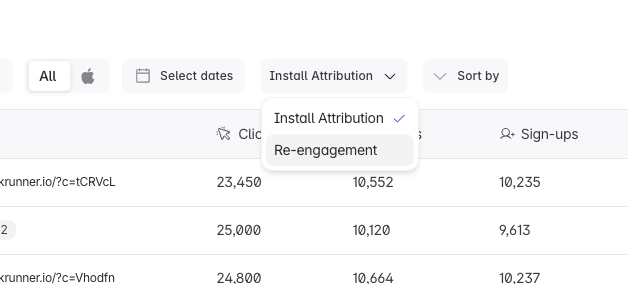
At the top of the [Campaigns](https://dashboard.linkrunner.io/dashboard/campaigns) page, switch the **Install Attribution** dropdown to **Re-engagement** to see already-installed opens instead of new installs.
 ***
## App not installed
These journeys go through the store. Deferred deep linking carries the original context across the install so the user resumes where they intended.
| Journey | What Linkrunner tracks | Where in the dashboard | What to set up |
| ------------------------------------------ | ----------------------------------------------------------------------- | ----------------------------------------------------------------------------------------------------- | ------------------------------------------------------------------------------------------------------------------- |
| **Website → Install** | Click → install, with the attributed campaign from `getAttributionData` | **Overview** stat cards (All / Attributed / Organic Installs); Campaigns → **Installs** | Linkrunner link as the store target; `init` + `getAttributionData` after first open |
| **Website → Install → Signup** | Install + user registration | **Sign-ups** and **Conversion** (sign-ups / installs) columns; user list in the campaign drawer | Call [`signup`](/sdk/react-native#user-identification-required) with `user_data.id` |
| **Website → Install → Purchase** | Install + revenue | **Revenue**, **ROAS**, **Paying Users**, **Daywise Revenue** columns | [`capturePayment`](/sdk/react-native#revenue-tracking); convert to one currency; map the event for Meta/Google ROAS |
| **Website → Install → Onboarding** | Install + activation event | Custom **event column**; [Events settings](https://dashboard.linkrunner.io/dashboard/settings/events) | Define the activation event and fire it with [`trackEvent`](/sdk/react-native#tracking-custom-events) |
| **Specific page → Install → Same context** | Deferred deep link carrying the page context through the install | Campaign **Installs**; the link resolves via `getAttributionData().deeplink` | Enable deferred deep linking on the campaign; pass the path into the link; parse `deeplink` in-app |
| **Referral link → Install** | Install + referral conversion | Campaign per referral; event column | [Referral codes](/features/referral-codes); add `?referrer=` to the link; handle it in-app |
The deferred deep link is read once, after the first open, from [`getAttributionData`](/sdk/react-native#getting-attribution-data). Check the `deeplink` field, parse the URL, and navigate. The SDK does not navigate for you.
***
## Reading the full journey
The end-to-end question (*which campaign drove this user, and what did they eventually do in the app*) is answered at the **campaign** level:
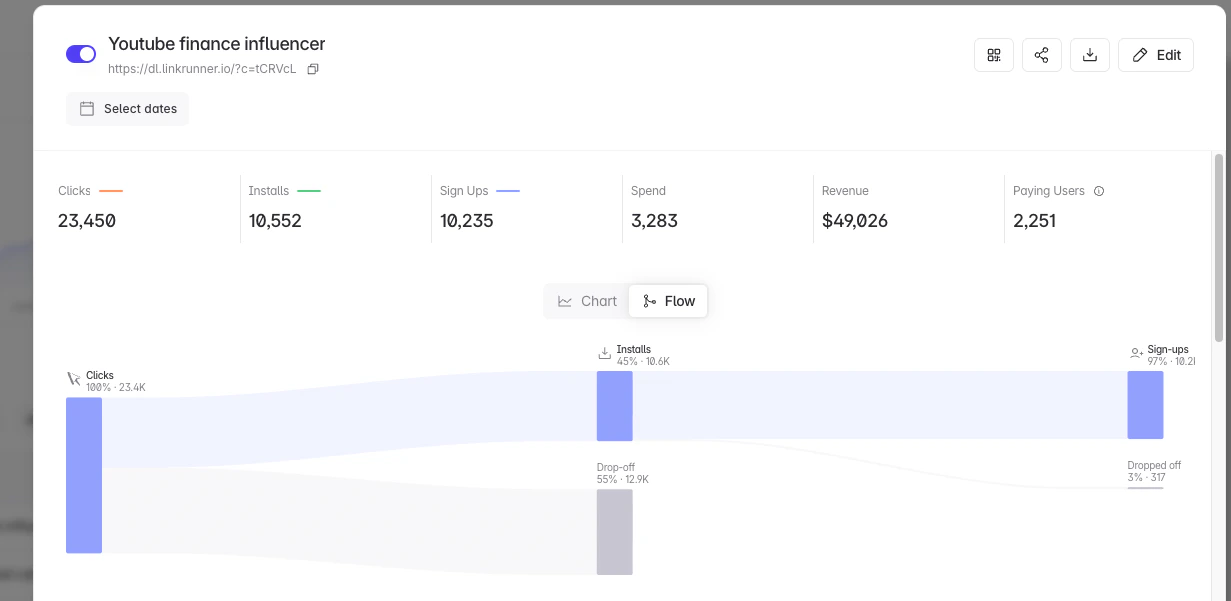
* Open a campaign's detail drawer ([`dashboard/campaigns?d=campaign-details&campaign={display_id}`](https://dashboard.linkrunner.io/dashboard/campaigns)) to see the **Clicks → Installs → Sign-ups** funnel as a flow diagram, plus revenue and paying users.
* Use the per-campaign **user list** in that drawer to see who signed up.
* Use the **Retention** columns to see whether those users stuck around.
***
## App not installed
These journeys go through the store. Deferred deep linking carries the original context across the install so the user resumes where they intended.
| Journey | What Linkrunner tracks | Where in the dashboard | What to set up |
| ------------------------------------------ | ----------------------------------------------------------------------- | ----------------------------------------------------------------------------------------------------- | ------------------------------------------------------------------------------------------------------------------- |
| **Website → Install** | Click → install, with the attributed campaign from `getAttributionData` | **Overview** stat cards (All / Attributed / Organic Installs); Campaigns → **Installs** | Linkrunner link as the store target; `init` + `getAttributionData` after first open |
| **Website → Install → Signup** | Install + user registration | **Sign-ups** and **Conversion** (sign-ups / installs) columns; user list in the campaign drawer | Call [`signup`](/sdk/react-native#user-identification-required) with `user_data.id` |
| **Website → Install → Purchase** | Install + revenue | **Revenue**, **ROAS**, **Paying Users**, **Daywise Revenue** columns | [`capturePayment`](/sdk/react-native#revenue-tracking); convert to one currency; map the event for Meta/Google ROAS |
| **Website → Install → Onboarding** | Install + activation event | Custom **event column**; [Events settings](https://dashboard.linkrunner.io/dashboard/settings/events) | Define the activation event and fire it with [`trackEvent`](/sdk/react-native#tracking-custom-events) |
| **Specific page → Install → Same context** | Deferred deep link carrying the page context through the install | Campaign **Installs**; the link resolves via `getAttributionData().deeplink` | Enable deferred deep linking on the campaign; pass the path into the link; parse `deeplink` in-app |
| **Referral link → Install** | Install + referral conversion | Campaign per referral; event column | [Referral codes](/features/referral-codes); add `?referrer=` to the link; handle it in-app |
The deferred deep link is read once, after the first open, from [`getAttributionData`](/sdk/react-native#getting-attribution-data). Check the `deeplink` field, parse the URL, and navigate. The SDK does not navigate for you.
***
## Reading the full journey
The end-to-end question (*which campaign drove this user, and what did they eventually do in the app*) is answered at the **campaign** level:
* Open a campaign's detail drawer ([`dashboard/campaigns?d=campaign-details&campaign={display_id}`](https://dashboard.linkrunner.io/dashboard/campaigns)) to see the **Clicks → Installs → Sign-ups** funnel as a flow diagram, plus revenue and paying users.
* Use the per-campaign **user list** in that drawer to see who signed up.
* Use the **Retention** columns to see whether those users stuck around.
 ### Metrics and where they live
| Metric | Where to find it |
| ----------------------------------------------------- | -------------------------------------------------------------------------------------------------- |
| Source / Channel / Campaign / Ad Set / Ad / Creative | Campaigns table (expand ad set and creative rows) |
| Clicks | Campaigns table + Overview |
| Installs (All / Attributed / Organic / iOS / Android) | Overview stat cards + Installs column |
| App re-engagement | Campaigns → **Re-engagement** view |
| Sign-ups / Conversion | Sign-ups and Conversion columns; user list in the campaign drawer |
| Activation / custom events | Custom event columns; [Events settings](https://dashboard.linkrunner.io/dashboard/settings/events) |
| Purchase / Revenue / ROAS | Revenue, ROAS, Paying Users, Daywise Revenue columns |
| Retention (D1, D7, …) | Rolling and Classic Retention columns |
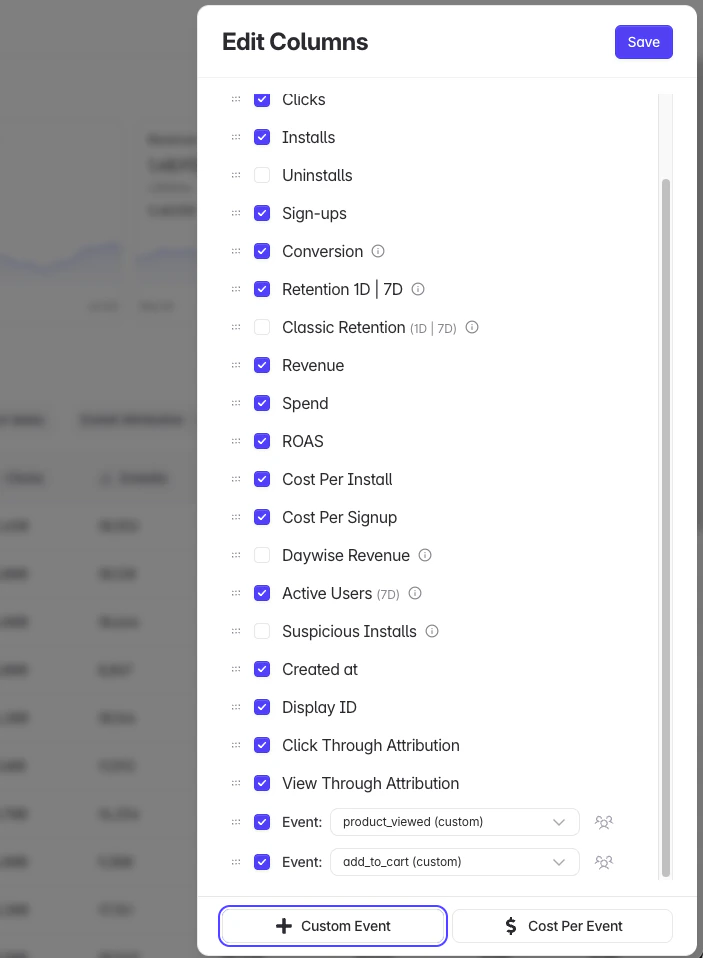
Most of these are columns on the Campaigns table. Use **Edit Columns** to choose which ones show, including per-event and cost-per-event columns:
### Metrics and where they live
| Metric | Where to find it |
| ----------------------------------------------------- | -------------------------------------------------------------------------------------------------- |
| Source / Channel / Campaign / Ad Set / Ad / Creative | Campaigns table (expand ad set and creative rows) |
| Clicks | Campaigns table + Overview |
| Installs (All / Attributed / Organic / iOS / Android) | Overview stat cards + Installs column |
| App re-engagement | Campaigns → **Re-engagement** view |
| Sign-ups / Conversion | Sign-ups and Conversion columns; user list in the campaign drawer |
| Activation / custom events | Custom event columns; [Events settings](https://dashboard.linkrunner.io/dashboard/settings/events) |
| Purchase / Revenue / ROAS | Revenue, ROAS, Paying Users, Daywise Revenue columns |
| Retention (D1, D7, …) | Rolling and Classic Retention columns |
Most of these are columns on the Campaigns table. Use **Edit Columns** to choose which ones show, including per-event and cost-per-event columns:
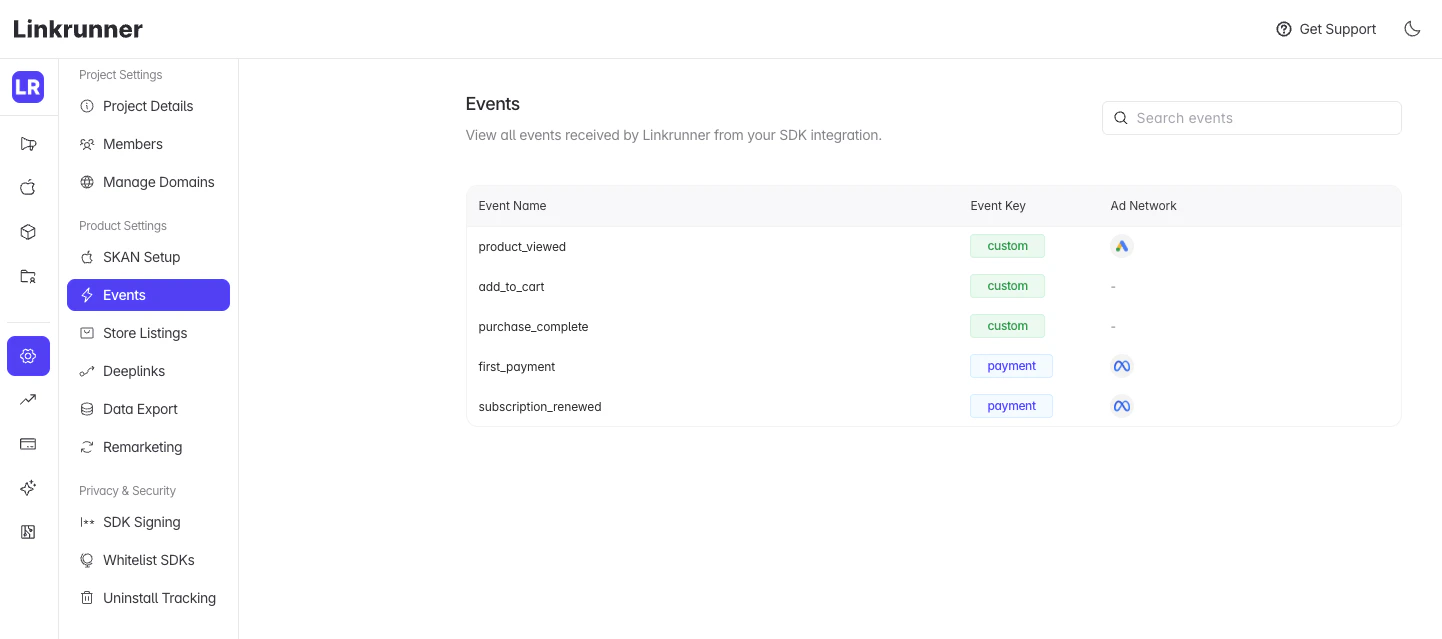
 Custom and payment events received from the SDK are listed under **Events settings**, along with the ad networks each is mapped to:
 Website page views and channel breakdowns are attribution inputs that feed the campaign numbers above; they are not a standalone report in the dashboard today. If you want to also collect on-site page views and traffic sources, the optional [Web SDK](/sdk/web) can enrich the journey.
## Troubleshooting
**App opens the store even though it is installed?** Deep linking is not verified. Check [Deep Linking Setup](/features/deep-linking-setup) and confirm your domain's `assetlinks.json` and `apple-app-site-association` are saved in Linkrunner.
**Deep link is null after install?** Confirm deferred deep linking is enabled on the campaign, and that you read `deeplink` from `getAttributionData` after `init` completes. See [Deferred Deep Linking](/features/deferred-deep-linking).
**Events or revenue not showing for a user?** They are only stored for users registered through [`signup`](/sdk/react-native#user-identification-required). Register the user, then re-send the event.
**Re-engagement not recorded for an installed app?** Make sure `handleDeeplink` runs on both cold start and warm start with the opened URL.
## Related guides
Open installed apps directly from web links
Carry context across the install
Run Meta web-to-app ads with CAPI
Attribute Google web-to-app campaigns
Track conversions and activation events
Capture payments and measure ROAS
**Need help?** Contact [support@linkrunner.io](mailto:support@linkrunner.io)
Website page views and channel breakdowns are attribution inputs that feed the campaign numbers above; they are not a standalone report in the dashboard today. If you want to also collect on-site page views and traffic sources, the optional [Web SDK](/sdk/web) can enrich the journey.
## Troubleshooting
**App opens the store even though it is installed?** Deep linking is not verified. Check [Deep Linking Setup](/features/deep-linking-setup) and confirm your domain's `assetlinks.json` and `apple-app-site-association` are saved in Linkrunner.
**Deep link is null after install?** Confirm deferred deep linking is enabled on the campaign, and that you read `deeplink` from `getAttributionData` after `init` completes. See [Deferred Deep Linking](/features/deferred-deep-linking).
**Events or revenue not showing for a user?** They are only stored for users registered through [`signup`](/sdk/react-native#user-identification-required). Register the user, then re-send the event.
**Re-engagement not recorded for an installed app?** Make sure `handleDeeplink` runs on both cold start and warm start with the opened URL.
## Related guides
Open installed apps directly from web links
Carry context across the install
Run Meta web-to-app ads with CAPI
Attribute Google web-to-app campaigns
Track conversions and activation events
Capture payments and measure ROAS
**Need help?** Contact [support@linkrunner.io](mailto:support@linkrunner.io)