> ## Documentation Index
> Fetch the complete documentation index at: https://docs.linkrunner.io/llms.txt
> Use this file to discover all available pages before exploring further.
# Meta SKAN Setup
> Set up SKAdNetwork attribution for Meta Ads iOS campaigns with Linkrunner
SKAdNetwork (SKAN) is Apple's privacy-preserving framework for iOS attribution. Meta uses SKAN postbacks to measure and optimize iOS App Promotion campaigns. This guide walks you through the complete Meta SKAN setup with Linkrunner.
Track your progress with the **Meta SKAN Integration Checklist**: [Settings → Integrations → Meta Ads → SKAN Integration](https://dashboard.linkrunner.io/dashboard/integrations/meta-ads?tab=skan_integration).
This guide covers the Meta-specific SKAN setup. If you haven't connected Meta Ads to Linkrunner yet, start with the
[Meta Ads integration guide](/ad-networks/meta-ads).
## Prerequisites
Before you begin, make sure you have:
* A [connected Meta Ads integration](/ad-networks/meta-ads) (App ID, ad account, and CAPI configured)
* Your app live with a SKAN-ready Linkrunner SDK version (see [minimum versions](/features/skadnetwork-integration#minimum-sdk-versions))
* Admin access to your Meta Business Manager and Meta Events Manager
## 1. Prepare Your App
### Update the SDK
Your app must run a SKAN-ready SDK version. The SDK updates conversion values automatically as users perform events, so no SKAN code is needed on your side. Check the [minimum SDK versions](/features/skadnetwork-integration#minimum-sdk-versions).
### Add Meta's Ad Network Identifiers
Apple only generates SKAN postbacks for ad networks listed in your app's `Info.plist`. Add Meta's identifiers under `SKAdNetworkItems`:
```xml theme={null}
SKAdNetworkItems
SKAdNetworkIdentifier
v9wttpbfk9.skadnetwork
SKAdNetworkIdentifier
n38lu8286q.skadnetwork
```
On Expo, add these under `ios.infoPlist.SKAdNetworkItems` in your `app.json`.
### Add the Postback Copy Endpoints
Add these keys to your `Info.plist` so Apple sends copies of SKAN postbacks to Linkrunner:
```xml theme={null}
NSAdvertisingAttributionReportEndpoint
https://linkrunner-skan.com
AttributionCopyEndpoint
https://linkrunner-skan.com
```
The Linkrunner Expo plugin adds these keys automatically.
## 2. Configure the SKAN Schema in Linkrunner
Linkrunner converts your event list into SKAN conversion values (0-63) and generates the fine and coarse values Meta needs.
Go to **Settings → SKAN Setup → Events Setup** in the [Linkrunner
Dashboard](https://dashboard.linkrunner.io/dashboard/settings/skan-setup?tab=event-setup). Add the events that
matter for optimization and drag rows to set priority. The topmost event has the highest priority.
For revenue events, set a **min** and **max** range. For occurrence events, set an **average**.
Click **Generate SKAN Mapping**. The dashboard shows the combination count in real time and warns if your
configuration would exceed Apple's limit of 64 conversion values.
If you already configured the schema for Google Ads, no extra work is needed. Linkrunner reuses the same schema for
Meta.
For background on how this maps to SKAN 4.0, see [Conversion Values in SKAdNetwork](/features/skadnetwork-conversion-values).
## 3. Map Events to Meta
Map each Linkrunner event to the corresponding Meta event (for example, `Purchase`, `AddToCart`, `ViewContent`) so postbacks are tagged correctly in Meta Events Manager.
Go to [Settings → Integrations → Meta Ads → Event
Mapping](https://dashboard.linkrunner.io/dashboard/integrations/meta-ads?tab=event_mapping).
For each event in your SKAN schema, select the Meta event it should map to.
Turn on **Send Revenue** for revenue events and select the currency.
Click **Save**.
See the full walkthrough in [Meta Ads → Event Mapping](/ad-networks/meta-ads#2-set-up-event-mapping).
## 4. Configure SKAN in Meta Events Manager
Complete this section only after the SKAN-ready SDK version is live in your app. Configuring Meta before the SDK
update ships leads to mismatched conversion values.
### Copy the Conversion Values into Meta
Open **Settings → SKAN Setup → Meta SKAN Configuration** in the [Linkrunner
Dashboard](https://dashboard.linkrunner.io/dashboard/settings/skan-setup?tab=meta-skan-configuration) to view
the generated fine and coarse conversion values.
In **Meta Events Manager**, select your app, then go to **Settings → iOS SKAdNetwork** and click **Configure
Conversion Values**.
Copy the fine and coarse conversion values from the Linkrunner Dashboard into Meta's configuration and save.
### Turn Off SKAdNetwork for the Facebook SDK
Turn **OFF** the **SKAdNetwork for the Facebook SDK** toggle so Meta routes SKAN postbacks through Linkrunner instead of the Facebook SDK:
Go to **Events Manager → Datasets** and select your dataset.
Open the **Apple's SKAdNetwork** section, then **Extra Settings → SKAdNetwork for the Facebook SDK**.
Turn the toggle **OFF**.
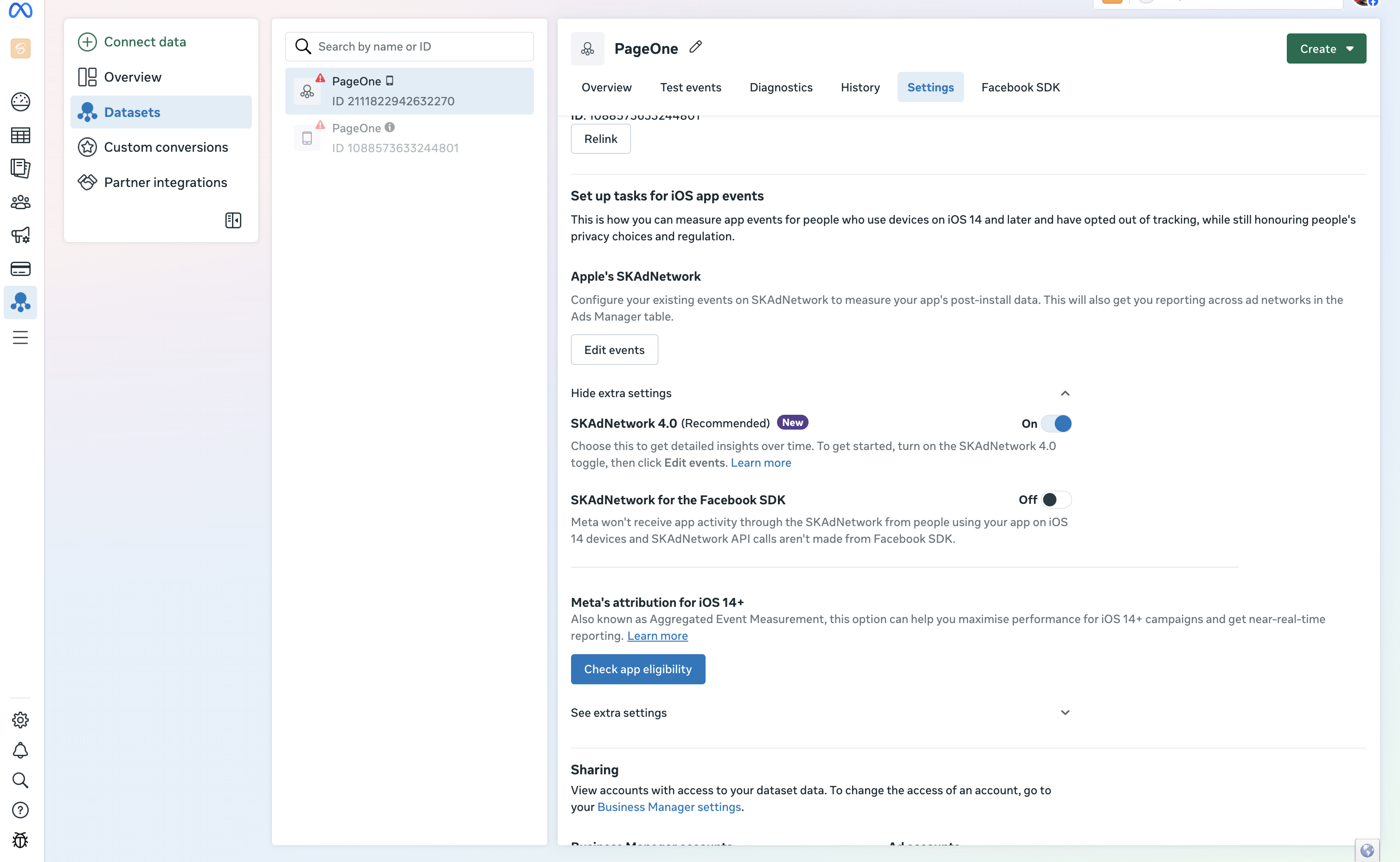 When this toggle is ON, Meta receives app activity via SKAdNetwork directly from the Facebook SDK and Linkrunner
cannot deliver accurate postbacks.
### Grant Access to Linkrunner
For Linkrunner to configure the SKAN schema on Meta on your behalf, grant access to **[access@linkrunner.io](mailto:access@linkrunner.io)** in your Meta Business Manager.
## 5. Verify the Setup
Confirm every item is complete in the [Meta SKAN Integration
Checklist](https://dashboard.linkrunner.io/dashboard/integrations/meta-ads?tab=skan_integration).
SKAN postbacks only flow once a Meta iOS App Promotion campaign is live and driving installs.
Postbacks appear in the [SKAN dashboard](/features/skan-dashboard/overview) as Apple delivers them. Apple delays
postbacks by design, so expect data 24 to 48 hours after installs begin.
## Troubleshooting
### No postbacks in the SKAN dashboard
* Confirm the `Info.plist` keys from [section 1](#1-prepare-your-app) are in the live app build
* Confirm the SKAN-ready SDK version is live and rolled out to 100% of users
* Wait 24 to 48 hours. Apple delays SKAN postbacks by design
### Conversion values look wrong in Meta
* Confirm the values in Meta Events Manager match **Settings → SKAN Setup → Meta SKAN Configuration** exactly
* Confirm you regenerated and re-copied the values after any schema change in Linkrunner
### Meta still attributes via the Facebook SDK
* Confirm the **SKAdNetwork for the Facebook SDK** toggle is **OFF** for your dataset
***
**Need help?** Contact [support@linkrunner.io](mailto:support@linkrunner.io)
When this toggle is ON, Meta receives app activity via SKAdNetwork directly from the Facebook SDK and Linkrunner
cannot deliver accurate postbacks.
### Grant Access to Linkrunner
For Linkrunner to configure the SKAN schema on Meta on your behalf, grant access to **[access@linkrunner.io](mailto:access@linkrunner.io)** in your Meta Business Manager.
## 5. Verify the Setup
Confirm every item is complete in the [Meta SKAN Integration
Checklist](https://dashboard.linkrunner.io/dashboard/integrations/meta-ads?tab=skan_integration).
SKAN postbacks only flow once a Meta iOS App Promotion campaign is live and driving installs.
Postbacks appear in the [SKAN dashboard](/features/skan-dashboard/overview) as Apple delivers them. Apple delays
postbacks by design, so expect data 24 to 48 hours after installs begin.
## Troubleshooting
### No postbacks in the SKAN dashboard
* Confirm the `Info.plist` keys from [section 1](#1-prepare-your-app) are in the live app build
* Confirm the SKAN-ready SDK version is live and rolled out to 100% of users
* Wait 24 to 48 hours. Apple delays SKAN postbacks by design
### Conversion values look wrong in Meta
* Confirm the values in Meta Events Manager match **Settings → SKAN Setup → Meta SKAN Configuration** exactly
* Confirm you regenerated and re-copied the values after any schema change in Linkrunner
### Meta still attributes via the Facebook SDK
* Confirm the **SKAdNetwork for the Facebook SDK** toggle is **OFF** for your dataset
***
**Need help?** Contact [support@linkrunner.io](mailto:support@linkrunner.io)