> ## Documentation Index
> Fetch the complete documentation index at: https://docs.linkrunner.io/llms.txt
> Use this file to discover all available pages before exploring further.
# Deferred Deep Linking
> Configure deferred deep links in campaigns to direct users to specific content after app installation
Direct users to specific screens after they install your app from a campaign link. Works on Android & iOS.
For Meta App Promotion campaigns, you can add the app link in Meta Ads Manager. Linkrunner syncs the Meta ad creative app link and returns it from `getAttributionData()`. Manual ad set and ad creative deep links saved in Linkrunner override synced Meta links.
## Quick Example
**Campaign Setup:** Enable deferred deep linking, set URL to `get.yourdomain.com/product/123`
**What Happens:**
1. User clicks campaign link (no app installed)
2. Redirects to App Store/Google Play
3. User installs and opens app
4. App calls `getAttributionData()`, receives deep link
5. Navigate user to product page
## Setup
### 1. Create Campaign with Deep Link
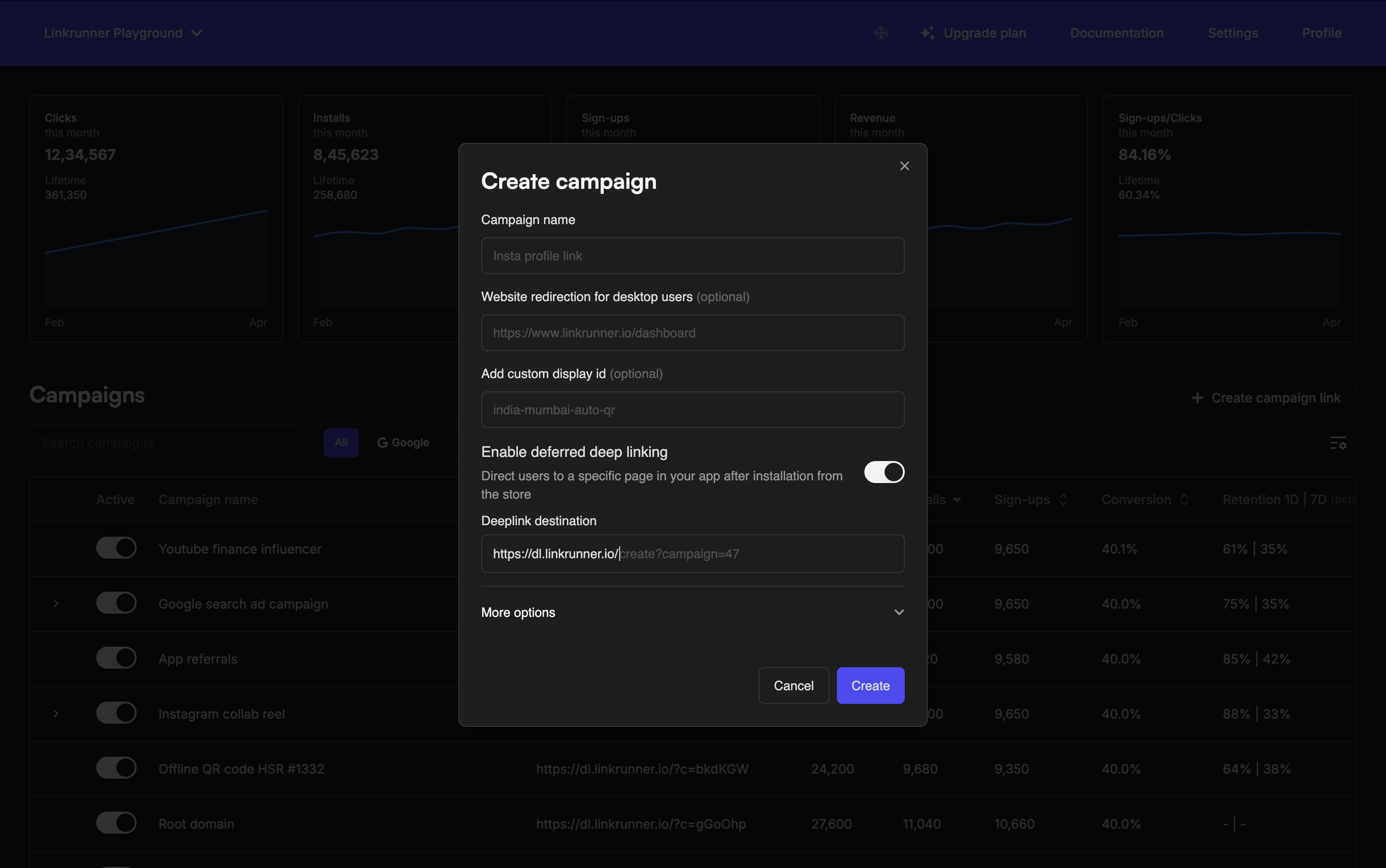 In the [Linkrunner Dashboard](https://dashboard.linkrunner.io/dashboard?m=create-campaign):
1. Click **"Create Campaign"**
2. Enable **"Deferred Deep Linking"** toggle
3. Enter deep link URL: `get.yourdomain.com/product/123`
**URL Format:**
```
get.yourdomain.com/product/sneakers-123
get.yourdomain.com/promo/SAVE20
get.yourdomain.com/onboarding?type=premium
```
### 2. Handle in Your App
Call `getAttributionData()` when you need attribution data, check for the `deeplink` field, parse the URL, and navigate:
**See:** [Getting Attribution Data - Android SDK Usage](/sdk/android/usage#getting-attribution-data)
**See:** [Getting Attribution Data - iOS SDK Usage](/sdk/ios/usage#getting-attribution-data)
**See:** [Getting Attribution Data - React Native SDK Usage](/sdk/react-native/usage#getting-attribution-data)
**See:** [Getting Attribution Data - Flutter SDK Usage](/sdk/flutter/usage#getting-attribution-data)
**See:** [Getting Attribution Data - React Native SDK Usage](/sdk/react-native/usage#getting-attribution-data)
## Common Use Cases
**Product Links:** `get.yourdomain.com/product/sneakers-123` → Opens product page
**Promo Codes:** `get.yourdomain.com/promo/SAVE20` → Opens promo with code applied
**Onboarding:** `get.yourdomain.com/onboarding?trial=30days` → Custom onboarding flow
**Referral Tracking:** `get.yourdomain.com/product/123?referrer=jane` → Deep link + attribution ([learn more](/features/referral-codes))
## Testing
1. Create test campaign with deferred deep linking enabled
2. Uninstall app completely
3. Click campaign link on mobile device
4. Install and verify you land on the correct screen
Always test on real devices before launching campaigns.
## Troubleshooting
**No deep link returned?** Check that deferred deep linking is enabled in campaign settings and URL is formatted correctly.
**Navigation fails?** Add logging to your URL parsing logic, verify route names match your app's navigation structure, and test with simple paths first.
**Attribution data is null?** Ensure the app was installed via the campaign link (not directly from store) and `getAttributionData()` is called after SDK initialization.
***
Questions? Contact [support@linkrunner.io](mailto:support@linkrunner.io)
In the [Linkrunner Dashboard](https://dashboard.linkrunner.io/dashboard?m=create-campaign):
1. Click **"Create Campaign"**
2. Enable **"Deferred Deep Linking"** toggle
3. Enter deep link URL: `get.yourdomain.com/product/123`
**URL Format:**
```
get.yourdomain.com/product/sneakers-123
get.yourdomain.com/promo/SAVE20
get.yourdomain.com/onboarding?type=premium
```
### 2. Handle in Your App
Call `getAttributionData()` when you need attribution data, check for the `deeplink` field, parse the URL, and navigate:
**See:** [Getting Attribution Data - Android SDK Usage](/sdk/android/usage#getting-attribution-data)
**See:** [Getting Attribution Data - iOS SDK Usage](/sdk/ios/usage#getting-attribution-data)
**See:** [Getting Attribution Data - React Native SDK Usage](/sdk/react-native/usage#getting-attribution-data)
**See:** [Getting Attribution Data - Flutter SDK Usage](/sdk/flutter/usage#getting-attribution-data)
**See:** [Getting Attribution Data - React Native SDK Usage](/sdk/react-native/usage#getting-attribution-data)
## Common Use Cases
**Product Links:** `get.yourdomain.com/product/sneakers-123` → Opens product page
**Promo Codes:** `get.yourdomain.com/promo/SAVE20` → Opens promo with code applied
**Onboarding:** `get.yourdomain.com/onboarding?trial=30days` → Custom onboarding flow
**Referral Tracking:** `get.yourdomain.com/product/123?referrer=jane` → Deep link + attribution ([learn more](/features/referral-codes))
## Testing
1. Create test campaign with deferred deep linking enabled
2. Uninstall app completely
3. Click campaign link on mobile device
4. Install and verify you land on the correct screen
Always test on real devices before launching campaigns.
## Troubleshooting
**No deep link returned?** Check that deferred deep linking is enabled in campaign settings and URL is formatted correctly.
**Navigation fails?** Add logging to your URL parsing logic, verify route names match your app's navigation structure, and test with simple paths first.
**Attribution data is null?** Ensure the app was installed via the campaign link (not directly from store) and `getAttributionData()` is called after SDK initialization.
***
Questions? Contact [support@linkrunner.io](mailto:support@linkrunner.io)