> ## Documentation Index
> Fetch the complete documentation index at: https://docs.linkrunner.io/llms.txt
> Use this file to discover all available pages before exploring further.
# Linkrunner Wallet
> Prepay a balance and let your invoices settle themselves
The wallet holds a balance on your account. When an invoice is due, it is settled from that balance instead of you paying it by hand each month.
Billing stays postpaid either way. The wallet changes how an invoice gets paid, not what you are charged.
The wallet is being rolled out account by account and is not enabled everywhere yet. If you do not see **Wallet** on your billing page, contact [support@linkrunner.io](mailto:support@linkrunner.io). You can still pay invoices normally in the meantime. See [Billing Overview](/billing/overview).
## 1. Add funds
Open **Wallet** on your [billing page](https://dashboard.linkrunner.io/dashboard/billing) and click **Add funds**.
We suggest 3, 6, or 12 months of your average bill, based on your last three paid invoices. You can enter your own amount instead.
If your recharge earns bonus free installs, the number is shown before you confirm.
**Bank transfer** (INR): transfer the amount, then submit the UTR. We match it against our bank statement and credit your wallet.
**Card, UPI, or netbanking**: pay through the hosted gateway page. The balance is credited as soon as the payment succeeds.
Once the funds land, any pending invoice is paid from the balance automatically. You do not need to do anything else.
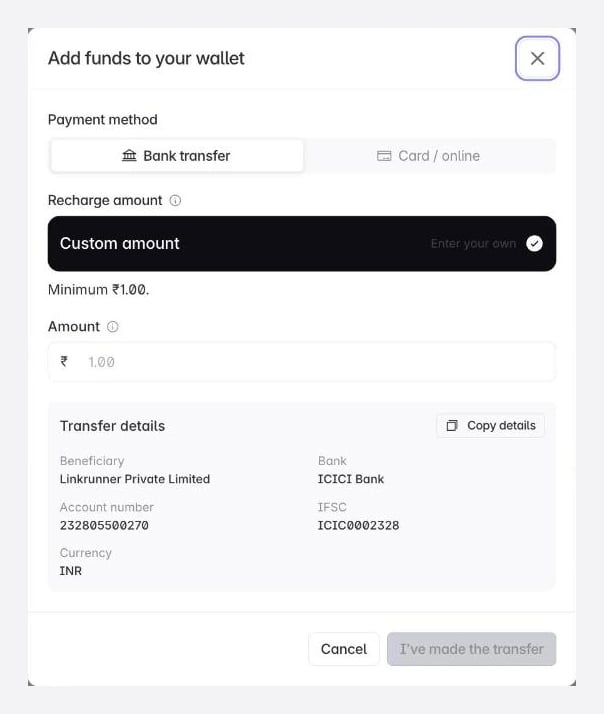 Recharging by bank transfer avoids the gateway entirely, which is the simplest route for large amounts.
## 2. How invoices settle
Two things happen automatically.
**After you add funds.** Any invoice already pending is settled from your balance. An invoice is settled **in full or not at all**, so if your balance is short, the invoice stays pending and the wallet screen shows the top-up needed to clear it.
**When your next invoice is generated.** Your balance is applied as the invoice is created, and the invoice shows the arithmetic:
```
Total amount - Wallet deducted = Net payable
```
If the balance covers the whole bill, the net payable is zero and there is nothing to pay. If it covers part of it, you pay the remainder using any [supported payment method](/billing/overview).
## 3. Available vs locked balance
Your balance is split into two numbers on the wallet screen:
| Balance | What it is |
| ------------- | ------------------------------------------------------ |
| **Locked** | Held against your estimated bill for the current month |
| **Available** | Everything above that, which you can withdraw |
The locked portion is what your next invoice will be settled against, so it cannot be withdrawn. The estimate updates through the month as your installs accumulate.
## 4. Withdraw funds
Click **Withdraw** on the wallet screen and enter an amount up to your available balance.
* The amount is deducted from your balance when you raise the request, so it cannot be spent twice.
* A processing fee is deducted from the payout. The fee and the net amount are shown before you confirm.
* You enter the account name, account number, and IFSC to be paid out to as part of the request.
* If a withdrawal is rejected or the payout fails, the full amount is returned to your balance.
Bonus free installs reward money kept in the wallet. Withdrawing gives up the whole unused bonus, so withdraw only what you are sure you do not need.
## Troubleshooting
Settlement is all-or-nothing. If your balance is less than the invoice, the invoice waits. The wallet screen shows exactly how much more you need.
Transfers are credited once we match your UTR against our bank statement. If it is still uncredited a full working day after you submitted the reference, contact [support@linkrunner.io](mailto:support@linkrunner.io) with the UTR.
The portion locked against your estimated bill for the current month is not withdrawable. Only the available balance can be withdrawn.
Yes, but adding funds by bank transfer is available for INR only. USD accounts recharge through the payment gateway.
No. You are billed for attributed installs at your normal tier rate. The wallet only changes how the invoice is paid.
**Need help?** Contact [support@linkrunner.io](mailto:support@linkrunner.io)
Recharging by bank transfer avoids the gateway entirely, which is the simplest route for large amounts.
## 2. How invoices settle
Two things happen automatically.
**After you add funds.** Any invoice already pending is settled from your balance. An invoice is settled **in full or not at all**, so if your balance is short, the invoice stays pending and the wallet screen shows the top-up needed to clear it.
**When your next invoice is generated.** Your balance is applied as the invoice is created, and the invoice shows the arithmetic:
```
Total amount - Wallet deducted = Net payable
```
If the balance covers the whole bill, the net payable is zero and there is nothing to pay. If it covers part of it, you pay the remainder using any [supported payment method](/billing/overview).
## 3. Available vs locked balance
Your balance is split into two numbers on the wallet screen:
| Balance | What it is |
| ------------- | ------------------------------------------------------ |
| **Locked** | Held against your estimated bill for the current month |
| **Available** | Everything above that, which you can withdraw |
The locked portion is what your next invoice will be settled against, so it cannot be withdrawn. The estimate updates through the month as your installs accumulate.
## 4. Withdraw funds
Click **Withdraw** on the wallet screen and enter an amount up to your available balance.
* The amount is deducted from your balance when you raise the request, so it cannot be spent twice.
* A processing fee is deducted from the payout. The fee and the net amount are shown before you confirm.
* You enter the account name, account number, and IFSC to be paid out to as part of the request.
* If a withdrawal is rejected or the payout fails, the full amount is returned to your balance.
Bonus free installs reward money kept in the wallet. Withdrawing gives up the whole unused bonus, so withdraw only what you are sure you do not need.
## Troubleshooting
Settlement is all-or-nothing. If your balance is less than the invoice, the invoice waits. The wallet screen shows exactly how much more you need.
Transfers are credited once we match your UTR against our bank statement. If it is still uncredited a full working day after you submitted the reference, contact [support@linkrunner.io](mailto:support@linkrunner.io) with the UTR.
The portion locked against your estimated bill for the current month is not withdrawable. Only the available balance can be withdrawn.
Yes, but adding funds by bank transfer is available for INR only. USD accounts recharge through the payment gateway.
No. You are billed for attributed installs at your normal tier rate. The wallet only changes how the invoice is paid.
**Need help?** Contact [support@linkrunner.io](mailto:support@linkrunner.io)